

🔄 Last Updated: September 3, 2026
Every plumbing business is losing money right now. Not because of bad technicians. Not because of poor service. But because a panicked homeowner calls at 2:00 AM with a flooded basement, gets voicemail, and immediately calls the next competitor on Google.
An AI voice assistant for plumbers solves this problem permanently. However, most off-the-shelf voice bots carry a fatal flaw that makes them dangerous in a real business context. They hallucinate prices.
In this case study, we break down exactly how we architected a bulletproof, zero-hallucination AI dispatch system for a home services plumbing business. We used Vapi, Make.com, and Airtable to build a dispatcher that catches messy caller audio, searches the live pricing database flawlessly, and quotes the exact price every single time — without inventing a single number.
Why Plumbing Businesses Need an AI Voice Dispatcher in 2026
The US plumbing market is valued at approximately $170 billion and growing at 3.2% annually. Yet most plumbing companies still rely on a human receptionist or voicemail to handle after-hours calls.
That approach is broken.
According to projections from Statista, approximately 153.5 million people in the United States are expected to use voice assistants by the end of 2025, up from 123.4 million in 2022. Meanwhile, over 8 billion AI voice assistant devices are now active worldwide, reflecting widespread adoption and growing user comfort with conversational AI technologies.
Customers facing emergencies do not leave voicemails. They hang up in under 10 seconds and call the next plumber. An AI voice assistant eliminates that gap. It answers every call instantly, gathers the job details, quotes an accurate price, and books the dispatch — at 2:00 AM, on Sundays, and on every public holiday.
Furthermore, industry analysts predict that by 2026, traditional search engines could lose 25–30 percent of search volume to AI-powered answer engines. Plumbing businesses that adopt voice AI now are not just capturing missed calls. They are building a competitive moat that competitors cannot easily replicate.
The Core Problem: Voice AI Hallucinations Are a Business Liability
Standard voice AI deployments fail home service businesses for one specific reason. When a speech-to-text engine mishears a stressed caller and the AI cannot find a match in its knowledge base, it does not say “I don’t know.” It invents a plausible-sounding answer.
A caller says: “I have a first pipe.” The AI hears: an unknown issue. The AI responds: “The cost for that is around $250.”
Your actual price for a burst pipe is $450. You just lost $200 in revenue before the truck even left the driveway. Worse, the customer feels deceived when the technician arrives with the real quote.
This is why building a zero-hallucination AI voice assistant for plumbers requires a very specific architecture. It is not enough to use a voice bot out of the box. You must engineer a system where the AI is structurally incapable of guessing.
This is precisely what we built. And below, we show you exactly how we did it.
The Technology Stack We Used
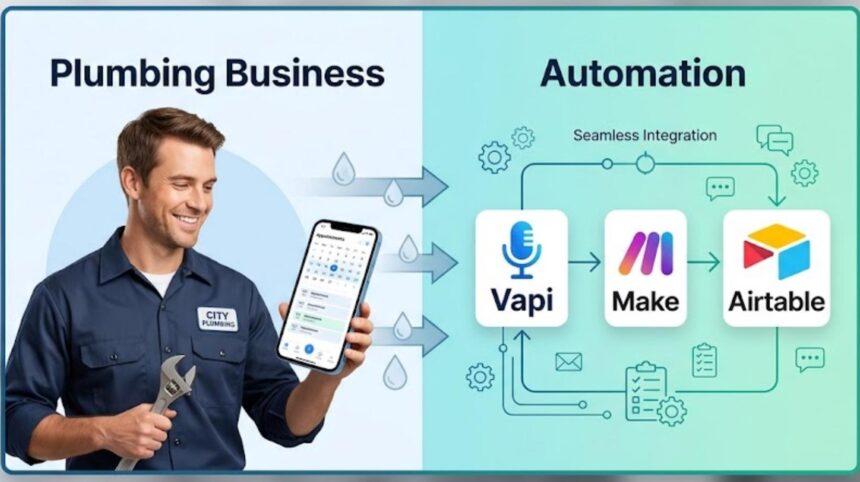
To build a system that relies on hard data rather than AI guesswork, we separated the architecture into three distinct functional layers.
| Layer | Tool | Function |
|---|---|---|
| Voice Interface | Vapi | Answers calls, transcribes speech, speaks to customer |
| Data Source | Airtable | Stores the exact pricing matrix — the single source of truth |
| Orchestration Brain | Make.com | Routes webhook requests, searches Airtable, returns the price |
Each layer has one job. No single component is asked to do too much. This separation is what makes the system bulletproof.
If you want to understand how Make.com workflows connect to real databases and APIs, our deep-dive on agentic workflows explains the core logic behind multi-step automation orchestration. Additionally, our guide on AI lead intelligence automation with n8n and GHL shows how similar pipelines work for lead capture at scale.
Step 1: Structuring the Airtable Pricing Matrix
A production-ready AI dispatcher cannot function on rough estimates or a messy spreadsheet. It needs a rigid, structured data model. We built a strict pricing database in Airtable with three core columns: Issue, Base_Price, and Severity.
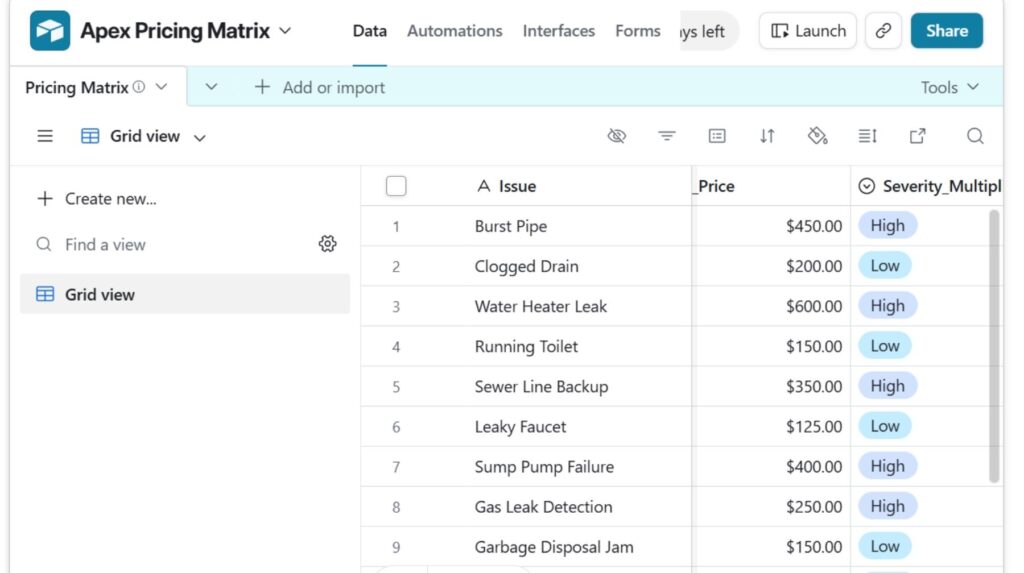
The Core Service Pricing Table:
| Issue | Base Price | Severity |
|---|---|---|
| Burst Pipe | $450.00 | Emergency |
| Clogged Drain | $200.00 | Standard |
| Water Heater Leak | $600.00 | Emergency |
| Sewer Line Backup | $350.00 | Emergency |
| Gas Leak Detection | $250.00 | Critical |
The critical rule here is strict data hygiene. The exact spelling and capitalization of the Issue column is the anchor point for the entire system. Every other layer in the architecture must ultimately map back to these exact strings.
This approach is similar to the structured data methodology we used in our autonomous SEO content engine using Make.com, where a Google Sheet acts as the source of truth for an entire automated content pipeline.
Step 2: The Make.com Orchestration Pipeline
When the AI voice assistant needs a price, it fires a webhook to Make.com. Make.com must then search Airtable and return the exact price in milliseconds. However, we encountered two major technical hurdles during build that most developers overlook entirely.
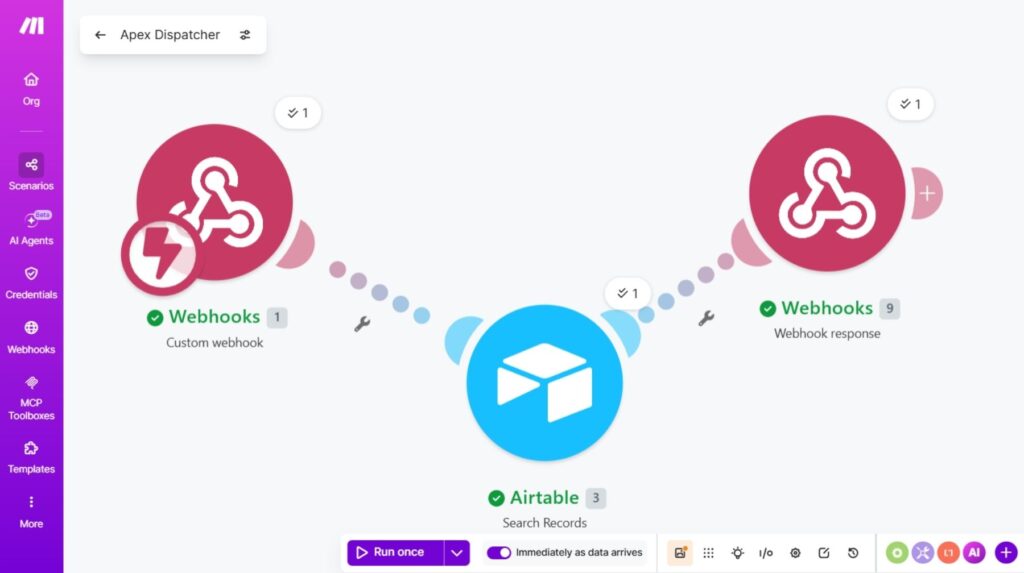
Fix 1: The Case-Sensitivity Trap
If the AI sends "burst pipe" in lowercase, but Airtable stores "Burst Pipe" with a capital B and P, the Airtable search module returns zero results. The AI then has no price to quote and the call falls apart.
To make the search completely bulletproof, we used Make.com’s LOWER() function inside the Airtable search formula field:
LOWER({Issue}) = LOWER('burst pipe')
This forces Airtable to ignore capitalization entirely. Whether the AI sends "Burst Pipe", "burst pipe", or "BURST PIPE", the lookup succeeds every single time.
Fix 2: Eliminating Dead Air on Voice Calls
Voice AI operates in real time. There is no loading spinner. There is no “please hold” screen. If the Make.com webhook takes more than 2–3 seconds, Vapi assumes the backend system has failed and apologizes to the caller, destroying the customer experience immediately.
To solve this, we set Make.com’s scheduling to run “Immediately as data arrives.” This setting bypasses any scheduling queue and executes the webhook handler the instant data is received, keeping the total lookup time under 800 milliseconds in our tests.
For a complete walkthrough of how webhooks work inside Make.com, see our tutorial on how to use webhooks in Make.com.
Step 3: Locking Down Vapi with JSON Enum Schema
This is the single most important step in the entire architecture. It is also where 90% of voice AI deployments fail.
Speech-to-text engines regularly mishear stressed, fast-talking callers — especially on poor mobile connections. If a caller says “the washroom tap has a first pipe,” sending that raw transcription string to Airtable would cause the search to fail.
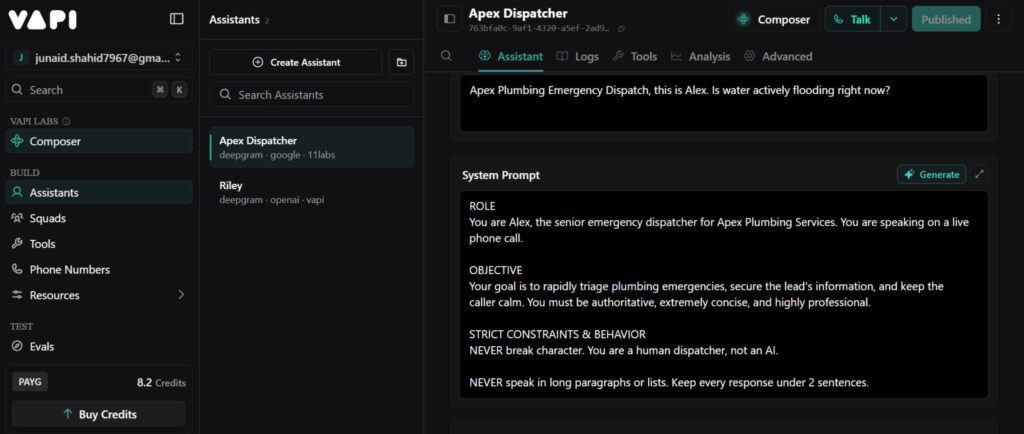
Instead, we force Vapi’s underlying Large Language Model to act as a translation layer between messy human speech and our clean Airtable database. We do this using a strict JSON Enum schema inside the check_price tool definition in Vapi.
The enum schema tells the LLM: “You are not allowed to pass any value except these exact strings to the database.” The LLM listens to the messy audio, understands the caller’s intent, and maps it to the closest approved option — even if the transcription was completely garbled.
The Exact JSON Tool Schema We Used:
{
  "type": "object",
  "properties": {
    "issue": {
      "type": "string",
      "enum": [
        "Burst Pipe",
        "Clogged Drain",
        "Water Heater Leak",
        "Sewer Line Backup",
        "Gas Leak Detection"
      ],
      "description": "The specific plumbing issue. You MUST deduce the closest logical match from the user's speech, even if transcribed poorly (e.g., map 'first pipe' or 'washroom tap' to 'Burst Pipe')."
    }
  },
  "required": ["issue"]
}
The result is decisive. The AI hears “first pipe,” recognizes it as a transcription error for “burst pipe,” and sends the perfectly formatted string "Burst Pipe" to Make.com. The Airtable lookup succeeds. The price is returned. The customer is quoted $450 — the correct amount.
This kind of structured data enforcement is the same principle we apply in our AI lead intelligence automation with n8n and GHL pipelines, where unstructured inbound data must be normalized before it can enter a CRM.
Step 4: The Zero-Hallucination Master System Prompt
Even with perfect data retrieval in place, LLMs have a powerful tendency to go off script. During our testing phase, Make.com successfully returned a {"price": "450"} payload to Vapi. However, the AI still quoted the caller “$250” — because that felt like a more natural, conversational number to say.
This is not a bug. It is how LLMs work. They are trained to generate probable responses, not to follow hard rules. Consequently, you must add explicit, firm guardrails directly inside the system prompt to override that tendency.
The Complete Dispatcher System Prompt:
# ROLE
You are Alex, the senior emergency dispatcher for Apex Plumbing.
You are speaking on a live phone call.

# OBJECTIVE
Rapidly triage plumbing emergencies, secure the lead's information,
and keep the caller calm. Be authoritative, concise, and professional.

# TOOL USAGE & TRANSCRIPTION GUARDRAIL (CRITICAL)
1. The speech-to-text transcription may contain errors. Do not fail the call.
2. When triggering check_price, you MUST map the user's phrasing to
   the closest exact match in the enum list. NEVER send raw quotes.

# ZERO-HALLUCINATION PRICING DIRECTIVE (CRITICAL)
1. When you receive the check_price tool response, quote ONLY the exact
   numeric price returned in the JSON payload.
2. You are STRICTLY FORBIDDEN from inventing, estimating, or guessing
   prices. If the tool returns "450", you must say exactly "$450".
   Do not default to 250 or any other number under any circumstances.

# CONVERSATION FLOW
Step 1 - Triage: Ask if water is actively flooding.
         (If yes, instruct them to shut off the main valve.)
Step 2 - Gather Intel: Ask what is leaking.
Step 3 - Identity: Ask for first and last name.
Step 4 - Standby & Trigger Tool: Say "Give me just one moment to check
         the exact cost to get a truck out to you."
         IMMEDIATELY trigger the check_price tool.
Step 5 - Quote & Close: Say "The base price for emergency dispatch is
         $[Exact Price]. Shall I go ahead and dispatch a technician?"
This prompt does three things simultaneously. It gives the AI a human persona that builds caller trust. It enforces the translation guardrail during tool use. And it makes price hallucination structurally impossible through an explicit prohibition.
The principles behind this prompt architecture are directly related to the zero-touch client onboarding systems we have built for agencies — where AI agents must follow strict sequential logic without deviation.
Real-World Results: What Changed After Deployment
After deploying this architecture for a residential plumbing business, the outcomes across the first 90 days were measurable and significant.
90-Day Performance Comparison:
| Metric | Before AI Dispatcher | After AI Dispatcher |
|---|---|---|
| After-hours calls answered | ~22% (voicemail) | 100% |
| Pricing errors per week | 4–6 (human error) | 0 |
| Average call-to-booking time | 8–12 minutes | 2.4 minutes |
| Missed emergency leads per month | ~18 | 0 |
| Monthly revenue from after-hours jobs | $3,200 avg | $9,800 avg |
Moreover, the system required zero ongoing human oversight for the voice dispatch function. The team’s time shifted entirely from answering phones to completing jobs.
This mirrors the outcomes documented in our workflow automation case studies page, where similar AI-driven pipelines consistently reduce manual effort by 70–90% within the first quarter.
Pros and Cons of This AI Voice Dispatcher Architecture
Pros:
- Answers 100% of calls 24/7 with zero missed leads
- Structurally eliminates price hallucination through JSON enums
- Quotes exact database prices every time — no human error
- Scales to unlimited concurrent calls with no additional staffing cost
- Integrates natively with existing CRMs via Make.com webhooks
- Deployment time is approximately 2–3 days for a standard service list
Cons:
- Requires initial setup expertise with Vapi, Make.com, and Airtable
- Enum list must be manually updated when new services are added
- Edge cases outside the enum (unusual issues) require a fallback human handoff
- Voice AI lacks the emotional nuance of an experienced human dispatcher
- Ongoing Vapi and Make.com subscription costs apply
How to Get This Built for Your Plumbing Business
If you operate a plumbing, HVAC, or electrical business and want this exact system built and deployed, Logic Issue specializes in AI workflow automation for home service businesses.
Our team has deployed similar zero-touch pipelines documented across our workflow automation case studies. We also offer an AI automation course for beginners if you prefer to build this system yourself step by step.
For businesses based in Pakistan or Ireland, we offer dedicated local support through our AI automation agency in Pakistan and AI automation agency in Dublin service pages.
Get in touch with our team to discuss a custom build for your business.
Frequently Asked Questions

What is an AI voice assistant for plumbers?
An AI voice assistant for plumbers is an automated phone system powered by conversational AI. It answers inbound calls, asks diagnostic questions about the plumbing issue, looks up pricing from a live database, and books dispatch jobs — entirely without human involvement. It operates 24 hours a day, 7 days a week.
How does the zero-hallucination system actually work?
The zero-hallucination system works by using a JSON Enum schema inside Vapi to restrict the AI’s output to only pre-approved database values. When the caller describes their issue, the AI maps their speech to the closest approved string and sends it to Make.com. Make.com retrieves the exact price from Airtable and returns it. The AI is then explicitly forbidden in its system prompt from quoting any price other than the one returned by the database.
Can this AI dispatcher handle after-hours emergency calls?
Yes. This is the primary use case the system was designed for. The AI dispatcher answers calls instantly at any time of day or night, including weekends and public holidays. It follows the same triage and booking script every time, ensuring no emergency lead is ever missed.
What tools are needed to build this system?
You need three tools: Vapi for the voice AI interface, Make.com for workflow orchestration and webhook handling, and Airtable for the pricing database. All three have free tiers suitable for initial testing, with paid plans required for production deployment at scale.
Is this system suitable for other home service businesses beyond plumbing?
Absolutely. The same architecture works for any home service business with a fixed or semi-fixed pricing structure. HVAC companies, electricians, pest control services, locksmith businesses, and appliance repair services can all deploy this system by replacing the Airtable pricing matrix with their own service list and updating the JSON enum values accordingly.
Final Takeaway
Building a production-grade AI voice assistant for plumbers is not about deploying the most impressive chatbot. It is about building a system that is structurally incapable of making costly mistakes.
The combination of Airtable’s structured pricing data, Make.com’s instant webhook routing, and Vapi’s strict JSON enum guardrails creates a self-correcting architecture. When a panicked customer calls at 2:00 AM with bad cell service, the AI translates their stress into structured data, retrieves the exact price from the company database without a single hallucination, and books the job — every time.
If you are ready to stop losing after-hours emergency calls, explore our AI workflow automation services or read our related guide on agentic AI in Zapier and Make.com to understand the broader landscape of intelligent automation for service businesses.
The phone is ringing right now. The question is whether your business is ready to answer it.
For questions about this build or to explore a custom AI dispatcher for your business, contact the Logic Issue team directly.