

🔄 Last Updated: September 3, 2026
I have personally built over 40 Make.com scenarios for clients ranging from solo consultants in Dublin to mid-sized SaaS companies operating across Pakistan and the UK. The single biggest insight I have gathered is this: most businesses are not failing at automation because Make.com is difficult. They fail because they try to automate everything at once instead of solving one painful problem first.
This guide gives you the complete picture. Whether you are an agency owner in Dublin or a freelancer in Lahore, you will leave with a working understanding of every core Make.com feature, a pricing breakdown that makes sense, and a roadmap of real workflows you can build today.
What Is Make.com and Why Does It Dominate in 2026
Make.com, formerly known as Integromat, is a visual no-code automation platform that connects your apps and automates tasks through visual workflows called scenarios. Rather than writing code, you drag and drop modules onto a canvas, link them together, and watch data move automatically between your tools.
By 2026, Make.com has grown into one of the most powerful automation platforms available. It connects over 3,000 applications natively and supports more than 350 AI-specific integrations. The global workflow automation market is valued at over $26 billion in 2026, and Make sits right at the center of that growth for non-technical teams.
What separates Make.com from simpler tools like Zapier is its visual canvas. You can see your entire automation logic on screen — branches, conditions, loops, error handlers — all at once. For agencies building complex client workflows, this visual transparency is not just convenient. It is essential.
Furthermore, Make.com added native AI modules for OpenAI, Anthropic’s Claude, and Google Gemini, making it possible to build intelligent, AI-powered automations without a single line of code. This is a game-changer for small agencies and solo operators who need enterprise-level capabilities on a freelancer budget.
At Logic Issue, we use Make.com as the backbone of our AI workflow automation services for clients across Dublin, Pakistan, and beyond. It consistently delivers the best balance of power, flexibility, and cost.
Make.com Advanced Automation and AI Agent Components
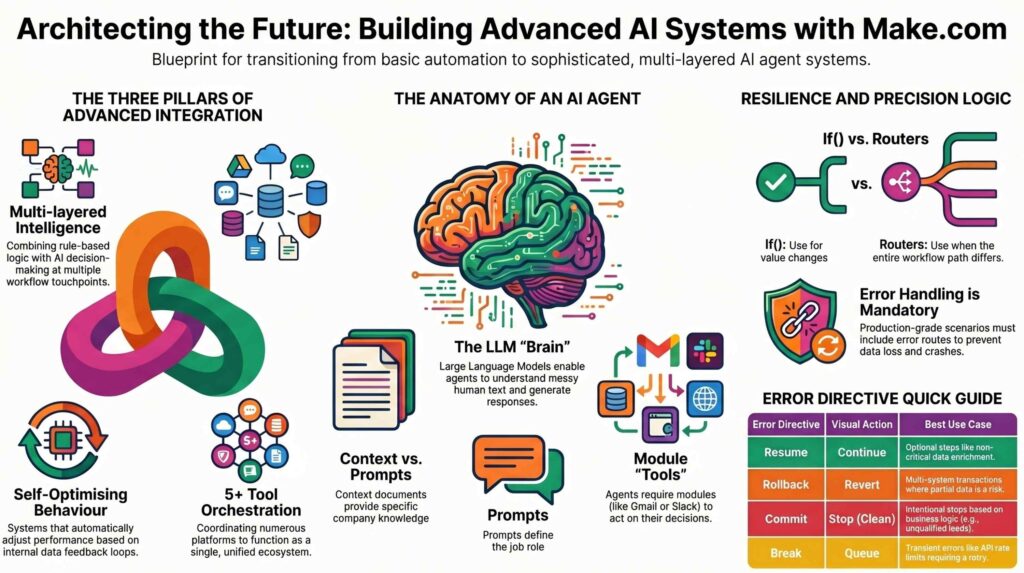
Building autonomous workflows requires a deep understanding of Make.com’s core logic and error-handling framework. The following technical breakdown categorizes the essential components—ranging from generative AI agents to advanced error directives—necessary for architecting “zero-touch” business systems. Use this reference to determine whether to use native flow control or custom error-handling routes.
| Feature | Type | Description | Typical Use Case | Method | Key Benefit |
|---|---|---|---|---|---|
| AI Agent | AI Element | LLM entity for reasoning and tool use. | Drafting support replies from docs. | Make ‘AI Agents’ section. | Complex decision automation. |
| Router | Flow Control | Module for splitting paths via filters. | Lead routing based on URL format. | Flow Control menu + filters. | Parallel path processing. |
| if() function | Logic | Conditional logic within a field mapping. | Labeling orders High/Low ticket. | Direct field input (semicolon). | Lean blueprints / easier debugging. |
| Resume | Error Handling | Ignores error; uses substitute bundle. | Handling failed optional enrichment. | Right-click → Add error handler. | Maintains scenario continuity. |
| Break | Error Handling | Stores failed bundle for retry. | Recovery from Rate Limits (429). | Configurable retry intervals. | Zero data loss on transient errors. |
| Rollback | Error Handling | Stops scenario & reverts transactions. | Preventing partial multi-system records. | Error handler route directive. | Ensures strict data integrity. |
| Commit | Error Handling | Confirms transactions & stops cleanly. | Stopping based on disqualification. | Terminal error route config. | Clean, early success termination. |
| Sleep + Repeater | Custom Logic | Custom exponential backoff loop. | Retrying strict third-party APIs. | Repeater loop + Sleep delay. | Granular control over retry timing. |
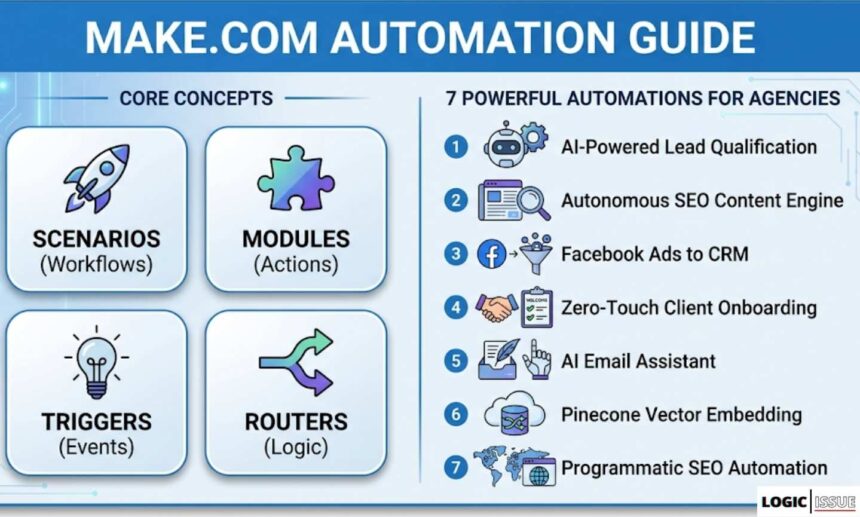
Make.com Core Concepts You Must Understand
Before building your first real scenario, you need to understand how Make.com thinks. The learning curve is real, but these five concepts unlock everything.
Scenarios
A scenario is Make.com’s name for an automation workflow. It has a trigger — the event that starts it — and a series of modules that perform actions in sequence. Scenarios can be simple (two modules, one connection) or extremely complex (40+ modules with conditional branches, loops, and error handlers).
Modules
Modules are the building blocks of every scenario. Each module represents one action — “Get a row from Google Sheets,” “Send an email via Gmail,” “Create a contact in HubSpot.” You connect modules by drawing lines between them on the visual canvas.
Triggers
Every scenario starts with a trigger module. There are two types. Scheduled triggers run your scenario at a set interval — every 15 minutes, every hour, once per day. Webhook triggers fire instantly the moment an external event happens, like a form submission or a payment. Webhooks are nearly always the better choice for responsive, client-facing automations.
Routers
Routers are where Make.com earns its reputation for power. A router splits your workflow into multiple branches, each with its own conditions. For example, a new lead from a contact form might route to one branch if the budget is above $5,000 and a completely different branch if it falls below. This conditional logic is the foundation of sophisticated automation.
Data Mapping
Data mapping is how you pass information between modules. When a form submission arrives, Make.com captures every field — name, email, phone number, message — and lets you drag those values directly into any subsequent module’s fields. This real-time data passing is what makes multi-step workflows powerful and accurate.
For a hands-on demonstration of these concepts in action, see our detailed tutorial on how to use webhooks in Make.com.
Make.com Pricing in 2026: The Honest Breakdown
Understanding Make.com pricing is the first step before building anything. In August 2025, Make transitioned from an operation-based billing model to a credit-based system. This change added new complexity that catches many users off guard.
Make.com Plans at a Glance
| Plan | Monthly Cost | Credits/Month | Active Scenarios | Interval | Best For |
|---|---|---|---|---|---|
| Free | $0 | 1,000 | 2 | 15 min | Testing only |
| Core | ~$10.59 | 10,000 | Unlimited | 5 min | Freelancers, small business |
| Pro | ~$20.69 | 40,000 | Unlimited | 1 min | Growing agencies |
| Teams | ~$37.99 | 40,000 | Unlimited | 1 min | Multi-user teams |
| Enterprise | Custom | Custom | Unlimited | Real-time | Large organisations |
Each module action in a scenario — a trigger, a filter, a data transformation, an app connection — costs one credit when it executes. A five-step lead capture scenario, for example, costs five credits per form submission. Therefore, a client receiving 500 leads per month burns through 2,500 credits just from that one workflow.
The Core plan at $10.59 per month offers a cost-per-operation of approximately $0.001. This is roughly three to five times cheaper than Zapier at equivalent workloads. At 200,000 monthly operations, the cost differential between Make and Zapier can reach 13x according to automation consultants.
However, AI-enhanced workflows consume credits at a significantly higher rate. A standard CRM automation might use 1–3 credits per run. The same workflow with an AI content generation step can consume 5–10 credits per execution. Teams adding AI to existing workflows frequently see credit usage triple without any increase in execution volume.
Pro tip from our agency experience: Always use webhook triggers instead of polling triggers wherever possible. A polling trigger running every minute burns 43,200 operations per month while doing absolutely nothing. A webhook trigger uses exactly one credit per real event. This single change can slash your monthly bill by 60% or more.
Setting Up Your First Make.com Scenario: Step by Step
The fastest way to learn Make.com is to build something real on day one. This walkthrough creates a lead capture automation that most agencies use as their first client deliverable.
Objective: When someone submits a contact form, automatically add them to a Google Sheet, send a personalized confirmation email, and post a notification to a Slack channel.
Step 1 — Create a New Scenario
Log into your Make.com account and click “Create a new scenario.” You will see a blank canvas with a large plus icon in the centre. Click it to choose your first module.
Step 2 — Add a Webhook Trigger
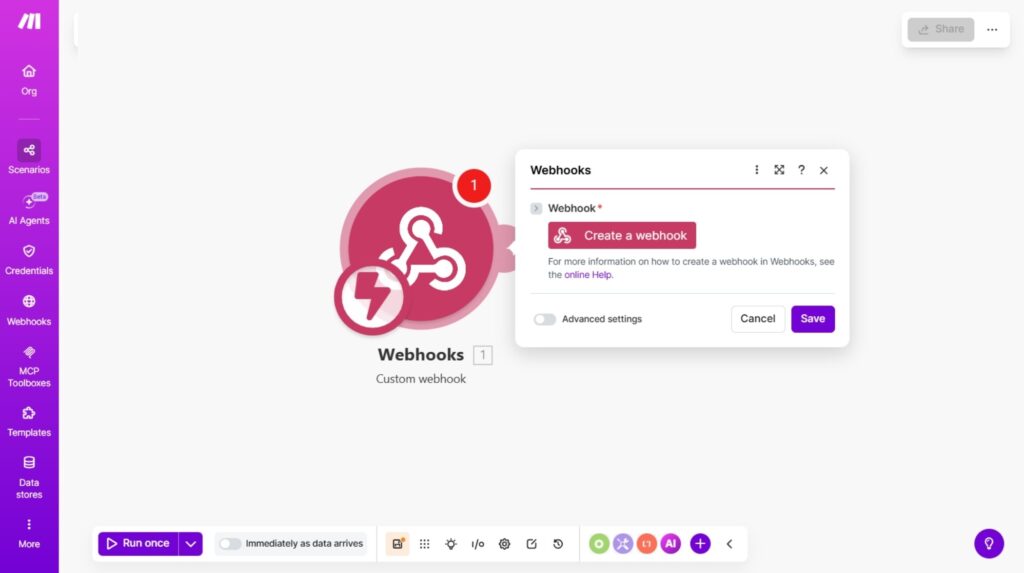
Search for “Webhooks” and select “Custom webhook.” Make.com generates a unique URL for your scenario. Copy this URL. You will paste it into your form tool’s webhook settings — whether that is Typeform, Gravity Forms, Webflow, or any other form builder that supports webhooks.
Step 3 — Map the Incoming Data
Click “Run once” and submit a test form. Make.com captures the incoming data and displays every field in a structured panel. You can now see your visitor’s name, email, and message ready to use in the next step.
Step 4 — Add a Google Sheets Module
Add a new module and search for “Google Sheets.” Select “Add a Row.” Connect your Google account, choose your spreadsheet, and map the form fields to the correct columns. Name goes to the Name column, email goes to the Email column, and so on.
Step 5 — Add a Gmail Module
Add another module and select “Gmail — Send an Email.” Map the visitor’s email address into the “To” field. Write your confirmation message, using the visitor’s first name from the mapped data to personalise it. This simple personalisation step increases reply rates dramatically.
Step 6 — Add a Slack Module
Add a final module for Slack — “Send a Message to a Channel.” Choose your notifications channel and build a message that includes the lead’s name, email, and any other relevant details. Your sales team now gets an instant notification for every new inquiry.
Step 7 — Activate and Test
Toggle the scenario from “Off” to “On.” Submit another real test form. Within seconds, you should see a new row in Google Sheets, a confirmation email in the inbox, and a Slack notification. Your first Make.com automation is live.
This foundation scenario supports almost infinite expansion. You can add a CRM module to create a contact in HubSpot, add an AI module to score the lead, or add a delay module to send a follow-up email 24 hours later. For a more advanced version of this workflow, read our guide on automating lead qualification with AI.
The 7 Most Powerful Make.com Automations for Agencies
Based on real client projects delivered through Logic Issue, these are the seven workflows that generate the highest ROI for agencies and small businesses in 2026.
1. AI-Powered Lead Qualification Pipeline
This workflow connects a contact form webhook to an AI module that scores and categorises incoming leads based on their message content, estimated budget, and company size. High-scoring leads get an immediate personalised email and a CRM record. Low-scoring leads receive a polite auto-response and are added to a nurture sequence.
Agencies typically save 8–15 hours per week on manual lead sorting with this single workflow. For a complete build tutorial, see our deep-dive on AI lead intelligence automation with n8n and GHL.
2. Autonomous SEO Content Engine
This scenario pulls a keyword list from a Google Sheet, passes each keyword to an AI module that drafts a full blog post, runs the draft through a quality check, and publishes it directly to a WordPress site — all without human intervention. We documented this exact system in our guide on building an autonomous SEO content engine with Make.com.
3. Facebook Lead Ads to CRM Automation
Every time a Facebook Lead Ad form is submitted, this workflow instantly creates or updates a contact record in the client’s CRM, sends a personalised follow-up email, assigns the lead to a sales rep, and logs the source data in a reporting sheet. Response time drops from hours to seconds. For the complete build, read our tutorial on automating Facebook Lead Ads to CRM with Make.com.
4. Zero-Touch Client Onboarding System
When a new client signs a contract or makes a payment, this workflow automatically generates a welcome email, creates a project in the agency’s project management tool, provisions a client portal, and schedules the first check-in call. Our zero-touch client onboarding guide breaks down every module in detail.
5. AI Email Assistant
This workflow monitors a Gmail inbox, uses an AI module to draft context-aware replies based on the email content and a pre-loaded knowledge base, and presents the draft to the human for one-click approval before sending. Email response time drops from hours to minutes. See our full walkthrough on building an AI email assistant.
6. Pinecone Vector Embedding Automation
For agencies building RAG (Retrieval-Augmented Generation) pipelines, this workflow automatically processes new documents, generates vector embeddings via an AI API, and stores them in Pinecone — keeping a knowledge base perpetually updated without manual intervention. Read our Pinecone automation tutorial for the complete build.
7. Programmatic SEO Automation
This scenario generates hundreds of location-based or topic-based landing pages automatically by combining a data source with a templated page structure, then publishing directly to WordPress. This is one of the highest-leverage SEO tactics available in 2026. Our programmatic SEO automation guide covers the exact scenario structure.
Make.com AI Features: What Has Changed in 2026
Make.com’s AI capabilities represent the most significant evolution of the platform in recent years. As of 2026, you can connect natively to OpenAI’s GPT-4o, Anthropic’s Claude, and Google’s Gemini directly within any scenario — no coding required.
Native AI Modules
The OpenAI and Anthropic modules in Make.com let you send prompts, receive completions, and pass the AI’s output to any subsequent module. This means you can use AI to classify incoming data, generate written content, extract structured information from unstructured text, summarise long documents, or make routing decisions within the same workflow.
For example, a support ticket automation might pass every incoming email to a Claude module with the instruction: “Classify this ticket as billing, technical, or general inquiry. Return only the category.” The router that follows directs the ticket to the correct team based on that single word output.
AI Agents in Make.com
Beyond single AI steps, Make.com now supports multi-step AI agent behaviours where one module’s AI output triggers a chain of decisions. This is closer to agentic workflow design than traditional linear automation. The agent pattern — observe, think, act — can be approximated within Make.com’s visual builder with careful module sequencing and conditional routing.
Critical Pricing Warning for AI Modules
Using Make.com’s native pre-configured AI modules without your own API key is significantly more expensive than bringing your own key. The platform adds a markup on AI processing credits. For high-volume AI workflows, always use the generic HTTP Request module with your own API key from OpenAI or Anthropic. This single decision can reduce your AI automation costs by 40–70%.
Make.com vs Zapier vs n8n: Which Should You Choose?
This is the most common question we receive at Logic Issue from agencies and business owners evaluating automation platforms for the first time. The answer depends entirely on your technical comfort and workflow complexity.
| Factor | Make.com | Zapier | n8n |
|---|---|---|---|
| Best for | Technical teams, agencies | Non-technical users | Developers, data-sensitive |
| Pricing model | Credit-based | Task-based | Self-hosted (flat rate) |
| Starting cost | $10.59/month | $19.99/month | ~$20/month (server) |
| Visual builder | Excellent canvas | Linear steps | Node-based graph |
| AI capabilities | 350+ AI apps | Growing | LangChain native |
| Learning curve | Moderate | Low | High |
| Self-hosting | No | No | Yes |
| App integrations | 3,000+ | 9,000+ | 400+ native |
| Best workflow type | Multi-branch complex | Simple trigger-action | AI agent workflows |
Make.com wins when your workflows require conditional branching, complex data transformation, and multi-step logic at a reasonable price. Zapier wins for simplicity and breadth of integrations. n8n wins when data privacy, self-hosting, or deeply customised AI agent behaviour is the priority.
For most agencies handling client work in Dublin, Pakistan, or anywhere else, Make.com is the right starting point. You can build production-ready client workflows in a day, and the visual canvas makes it easy to explain your work to non-technical clients.
Our full comparison of agentic AI in Zapier and Make.com explores the decision in much deeper detail.
8 Pro Tips That Separate Agency-Level Make.com Builders from Beginners
These are the insights that took our team months of hands-on client work to learn. Apply them from day one.
Always use webhooks over polling. A polling trigger running every minute costs 43,200 operations per month in idle time. A webhook uses one credit per real event. Switch every polling trigger to a webhook wherever your app supports it.
Place filters as early as possible. A filter costs one credit but can stop a scenario from consuming five more credits downstream. Early filtering is the single most effective way to reduce operational costs on high-volume workflows.
Use Make.com’s built-in error handling. Every production scenario should have an error handler module. Without it, a single bad API response silently kills your automation and you may not notice for days. Add a “Catch Error” route to every critical branch.
Never process large files through Make.com’s servers. Make.com charges credits based on data volume for certain operations. For large PDFs or images, send only the file URL through the scenario and have the destination app fetch the file directly.
Label every module clearly. In complex scenarios with 20+ modules, default module names like “Google Sheets 3” are useless. Rename each module immediately — “Add Lead to Tracking Sheet” tells you exactly what is happening at a glance.
Use scenario templates as starting points. Make.com’s template library contains hundreds of pre-built scenario structures. Starting from a template and modifying it is five times faster than building from scratch. Most of our client workflows began life as templates.
Aggregate data before writing to a database. Instead of creating one database record per operation, use Make.com’s aggregator module to batch multiple records and write them in a single operation. This can reduce credit consumption by 80% on high-volume data workflows.
Monitor your top three scenarios monthly. In our agency experience, three scenarios typically account for 60–80% of total monthly credit consumption. Make.com’s Pro plan includes full-text execution logs that make this audit straightforward. Audit monthly, optimise quarterly.
Make.com for Agencies: How to Package and Sell Automation Services
If you are building automation workflows for clients rather than just for your own business, the economic opportunity in 2026 is significant. Businesses that automate even one core workflow save an average of 8–12 hours per week per process, according to McKinsey research on automation adoption.
At Logic Issue, we structure our Make.com agency services into three clear packages that clients understand immediately.
A starter automation package delivers one complete workflow solving a single painful problem — typically lead capture, client onboarding, or support ticket routing. This takes three to five days to build and delivers immediate, visible ROI. It is the foot in the door for every client relationship.
A growth retainer covers the automation of one full department — sales, marketing, or operations. This is delivered over four to six weeks and includes ongoing monitoring, credit optimisation, and monthly improvements.
An enterprise transformation project covers multi-department AI automation with custom AI agents, video production pipelines, CRM intelligence systems, and data reporting dashboards. These engagements typically run three months and command significantly higher fees.
The case for selling Make.com automation is simple: clients save money immediately, the ROI is measurable, and the recurring nature of automation maintenance creates a natural ongoing relationship.
To see how we deliver these services in practice, review our workflow automation case studies. If you are interested in partnering with us or referring clients, visit our partner programme page.
Connecting Make.com to AI, CRM, and Marketing Tools
Make.com’s power multiplies dramatically when connected to the right stack. These are the integrations that our agency uses most frequently for client projects.
CRM integrations — HubSpot, GoHighLevel, and Salesforce all have native Make.com modules. Connecting your lead capture workflows directly to your CRM eliminates manual data entry entirely. Our CRM and lead intelligence automation service is built primarily on these connections.
AI integrations — OpenAI’s GPT-4o, Anthropic Claude, and Google Gemini. These enable content generation, lead scoring, email drafting, document classification, and dozens of other intelligent automation steps. For protecting sensitive data passed through these connections, read our guide on LLM data security risks.
SEO and content tools — WordPress, Airtable, Google Sheets, and SEMrush. Combining these with AI modules creates fully autonomous content pipelines.
Video and media tools — Make.com connects to video generation APIs that power our AI video automation pipeline service. A single URL can trigger a complete cinematic ad production workflow.
Communication tools — Slack, Gmail, Outlook, and SMS platforms ensure that every automation has a human notification layer for oversight and approval. This is particularly important for agentic AI workflows where an AI agent is making decisions autonomously.
Personal Experience: What We Learned Building 40+ Client Scenarios
After building automations for clients ranging from solo consultants to companies with 200+ employees, certain patterns emerge consistently.
The most expensive mistake we see is over-engineering the first scenario. A client wants a 20-module AI-powered lead nurture system before they have validated that their lead volume even justifies automation. We always recommend starting with a three-module scenario that solves one specific problem, measuring the result for 30 days, then expanding.
The most valuable insight from our own use: scenarios break. APIs go down, data formats change, third-party services return unexpected responses. Every production scenario we build for clients includes an error handler, a Slack notification for failures, and a weekly audit review. Reliability matters more than sophistication.
The highest-ROI automation we have built was not an AI workflow. It was a simple Google Sheets to Gmail trigger that sent personalised renewal reminder emails to a client’s subscribers 30 days before their contracts expired. Three modules. Built in two hours. Generated $40,000 in retained revenue in the first quarter.
Start simple. Measure everything. Then scale what works.
If you want our team to build Make.com automations for your business, explore our AI workflow automation services or contact us directly.
Frequently Asked Questions

Is Make.com free to use?
Make.com offers a permanent free tier with 1,000 credits per month and two active scenarios. This is sufficient for testing and running very light personal automations. Most small businesses and agencies need the Core plan at approximately $10.59 per month, which provides 10,000 credits and unlimited active scenarios.
How is Make.com different from Zapier?
Make.com uses a visual canvas where you can see and build complex multi-branch workflows with conditional routers, data transformers, and error handlers. Zapier uses a linear step-by-step builder better suited to simple trigger-action automations. Make.com is generally 3–5x cheaper than Zapier at comparable operation volumes, but has a steeper initial learning curve.
Can Make.com build AI-powered workflows?
Yes. Make.com has native modules for OpenAI, Anthropic Claude, and Google Gemini as of 2026, along with connections to over 350 AI-specific applications. You can build AI-powered content generation, lead scoring, document classification, and intelligent routing workflows without writing any code.
What happens when I run out of credits in Make.com?
Your active scenarios pause automatically at the credit limit. Make.com sends email warnings at 80% and 100% of your credit usage. You can purchase additional operation packs at approximately $11 per 10,000 credits, or upgrade to a higher plan tier. Unlike some platforms, Make.com does not charge automatic overage fees.
Is Make.com suitable for agency client work?
Absolutely. Make.com is one of the most widely used platforms among no-code automation agencies globally. Its visual builder makes it easy to demonstrate workflows to clients, its pricing is manageable at agency scale, and its flexibility handles the complex multi-step logic that client work often requires. Logic Issue uses Make.com as the primary platform for our AI automation services delivered to clients in Dublin, Pakistan, and internationally.
What to Read Next
Ready to go deeper? These articles expand on specific Make.com use cases covered in this guide:
- How to Build an Autonomous SEO Content Engine with Make.com
- Automate Lead Qualification with AI
- Zero-Touch Client Onboarding System
- How to Use Webhooks in Make.com
- Programmatic SEO Automation with Make.com and WordPress
- Automate Facebook Lead Ads to CRM with Make.com
- Agentic AI in Zapier and Make.com
- AI Workflow Automation Services — Logic Issue
This guide is written by the Logic Issue automation team, based on hands-on experience building Make.com scenarios for clients across Ireland, Pakistan, and internationally. We update this article regularly as Make.com releases new features and pricing changes.