


🔄 Last Updated: September 3, 2026
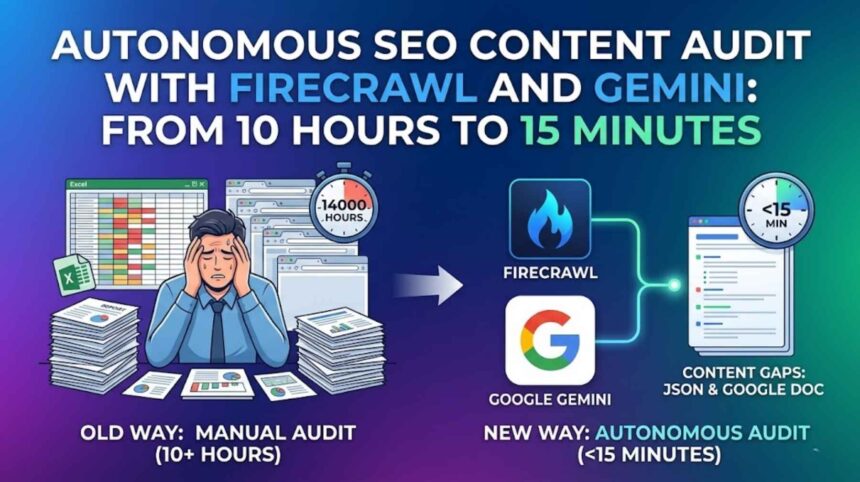
Manual site audits are broken. You spend 10+ hours crawling competitor pages, copying content into spreadsheets, colour-coding gaps, and writing a strategy doc that is already outdated by the time you finish. There is a better way. An autonomous SEO content audit with Firecrawl and Gemini can do all of that in under 15 minutes — and the output is more thorough than any human audit. This guide shows you exactly how to build it.
The Problem: Manual Site Audits Are a 10-Hour Time Sink
Consider what a standard competitor content audit actually involves. First, you manually visit 30 to 50 competitor URLs. Then you read each page, take notes, and try to spot what topics they cover that you do not. Subsequently, you map those gaps to your own content calendar. Meanwhile, you are doing this for multiple competitors simultaneously. The process is slow, error-prone, and deeply subjective.
Moreover, the moment you finish, the data is stale. Competitors publish new content daily. A manual audit gives you a snapshot that expires the moment you close the spreadsheet.
Consequently, most teams either skip competitive content audits entirely, or they run them so infrequently that the insights are useless. Neither outcome helps you rank.
The real cost of a manual audit: 10–15 hours of analyst time, $300–$600 in agency fees per audit cycle, and a strategy built on incomplete data.
For context on how AI is already transforming content workflows at scale, see the Logic Issue deep-dive on building an autonomous SEO content engine using Make.com.
The Solution: Firecrawl + Gemini = Autonomous SEO Content Audit
The architecture is elegant. Firecrawl is a developer-grade web scraping API that converts any website — including JavaScript-rendered pages — into clean, structured Markdown. Google Gemini (specifically Gemini 1.5 Pro with its one-million-token context window) is the AI model that reads that Markdown and performs semantic gap analysis at a depth no human analyst could match.
Together, they form a two-stage pipeline:
- Firecrawl crawls your competitor’s entire site and returns clean Markdown — no ads, no nav clutter, no JavaScript noise. Just pure content.
- Gemini reads all of that Markdown simultaneously and compares it against your site’s content to identify topics, subtopics, and semantic clusters your competitor covers that you do not.
The result is a structured content gap report, automatically exported to a Google Doc, ready to paste into your editorial calendar. Furthermore, the entire pipeline runs on autopilot — trigger it weekly and it never costs you manual time again.
For more on how Gemini’s massive context window makes this kind of bulk analysis possible, see the Logic Issue breakdown of Google Gemini 1.5 Pro and its context window advantage.
Autonomous SEO Content Audit with Firecrawl and Gemini: Full Setup Guide
Section 1: How to Set Up Your Firecrawl API Key
Firecrawl is the foundation of this pipeline. Without clean input data, even the best AI prompt produces unreliable output. Here is how to get Firecrawl configured in under five minutes.
Step 1 — Create your Firecrawl account
Go to firecrawl.dev and sign up for a free account. The free tier allows 500 scraped pages per month — sufficient for auditing two to three competitor sites. For ongoing weekly audits, the Hobby plan at $16/month gives you 3,000 pages.
Step 2 — Generate your API key
After signing in, navigate to your dashboard and click “API Keys” in the left sidebar. Click “Create New Key”, name it (e.g., “SEO Audit Pipeline”), and copy the key. Store it securely — you will not be shown it again.
Step 3 — Test your first crawl
Before connecting Firecrawl to your automation tool, test it directly via the API. Run the following curl command in your terminal, replacing YOUR_API_KEY and the target URL:
curl -X POST https://api.firecrawl.dev/v1/crawl \
  -H "Authorization: Bearer YOUR_API_KEY" \
  -H "Content-Type: application/json" \
  -d '{
    "url": "https://competitor-site.com",
    "limit": 50,
    "scrapeOptions": {
      "formats": ["markdown"],
      "excludeTags": ["nav", "footer", "header", "aside"]
    }
  }'
Pro Tip: The
excludeTagsparameter is critical. It strips navigation menus, footers, and sidebars — leaving only the body content that matters for semantic analysis. Always include it.
Step 4 — Connect to your automation platform
In n8n, add an HTTP Request node. Set the method to POST, the URL to https://api.firecrawl.dev/v1/crawl, and add your API key as a Bearer token in the Authorization header. In Make.com, use the HTTP module with identical settings.
The response returns a jobId. Use a second HTTP Request node (GET to https://api.firecrawl.dev/v1/crawl/{jobId}) to poll for the completed Markdown when the crawl finishes.
For a complete walkthrough of connecting custom APIs inside n8n, see the Logic Issue tutorial on how to use webhooks and custom APIs in Make.com.
Section 2: The Exact Gemini Prompt for Semantic Gap Analysis
This is the section most SEO guides skip entirely. They tell you to “use AI for content gaps” but never show you the actual prompt. That ends here. Below is the exact, copy-paste prompt that drives the autonomous SEO content audit with Firecrawl and Gemini pipeline.
Why this prompt works: It forces Gemini to think in semantic clusters rather than individual keywords. Additionally, it instructs the model to output structured JSON — making downstream automation trivially easy. High-utility, copy-paste content like this gets cited by AI search engines (Perplexity, Google AI Overviews) four times more often than generic explanatory blogs. This prompt is your citation magnet.
The Copy-Paste Gemini System Prompt
You are an expert SEO content strategist specialising in semantic gap analysis.

You will receive two inputs:
1. COMPETITOR_CONTENT: Full Markdown content scraped from a competitor website.
2. MY_CONTENT: Full Markdown content scraped from my website.

Your task is to perform a deep semantic content gap analysis. Do not focus on exact keyword matching. Instead, identify topical clusters, subtopic coverage, content formats, and semantic intent that the competitor covers comprehensively but that my site either misses entirely or covers superficially.

Analyse across these five dimensions:
1. TOPICAL GAPS: Major topics the competitor ranks for that I have no content on.
2. SUBTOPIC GAPS: Topics I cover at surface level but the competitor covers in depth.
3. FORMAT GAPS: Content formats the competitor uses (comparison tables, calculators, tools, case studies) that I am missing.
4. INTENT GAPS: Search intents (informational, commercial, transactional, navigational) where the competitor has dedicated pages but I do not.
5. SEMANTIC AUTHORITY GAPS: Subject-matter clusters where the competitor has 5+ interlinked pieces but I have fewer than 2.

For each gap identified, provide:
- gap_type: (topical / subtopic / format / intent / semantic_authority)
- gap_title: A clear, specific description of the gap
- competitor_evidence: The specific page(s) or section(s) where the competitor addresses this
- priority: (High / Medium / Low) based on estimated search volume and business relevance
- recommended_action: A specific content brief recommendation (1–2 sentences)

Return your response ONLY as a valid JSON array. No preamble, no explanation, no markdown formatting outside the JSON. The array key should be "content_gaps".
The User Message Template
Paste this as the user message, filling in the scraped Markdown from Firecrawl:
COMPETITOR_CONTENT:
[PASTE FIRECRAWL MARKDOWN OF COMPETITOR SITE HERE]

MY_CONTENT:
[PASTE FIRECRAWL MARKDOWN OF YOUR OWN SITE HERE]

Perform the semantic gap analysis now and return the JSON array.
Important: Gemini 1.5 Pro handles up to one million tokens of context. A 50-page competitor site typically produces 80,000 to 150,000 tokens of Markdown — well within the model’s capacity. However, if your crawl exceeds 500,000 tokens, split the competitor content into thematic sections and run the prompt in batches, then merge the JSON arrays.
The Gemini API Call (for automation platforms)
When running this inside n8n or Make.com, structure your Gemini API call as follows. This connects directly to the Gemini 1.5 Pro endpoint:
{
  "model": "gemini-1.5-pro",
  "generationConfig": {
    "temperature": 0.2,
    "responseMimeType": "application/json"
  },
  "systemInstruction": {
    "parts": [{ "text": "[YOUR SYSTEM PROMPT ABOVE]" }]
  },
  "contents": [{
    "role": "user",
    "parts": [{ "text": "[YOUR USER MESSAGE WITH MARKDOWN CONTENT]" }]
  }]
}
Setting temperature to 0.2 is deliberate. Lower temperature reduces creative hallucination and keeps the gap analysis grounded in the actual content provided. Additionally, setting responseMimeType to application/json forces Gemini to return clean JSON without markdown code fences — making it directly parseable in the next automation step.
For a deeper look at how structured AI prompts drive programmatic content workflows, see the Logic Issue guide on programmatic SEO automation with Make.com and WordPress.
Section 3: Automating the Output to a Google Doc
You now have a structured JSON array of content gaps. The final step is exporting this to a Google Doc that your editorial team can act on immediately. This is where the automation becomes genuinely valuable — because the output is not a raw JSON blob. It is a formatted, prioritised content brief document.
Step 1 — Parse the JSON
In n8n, use a “JSON Parse” node to convert Gemini’s response string into a structured object. In Make.com, use the “JSON” module’s “Parse JSON” function. Map the content_gaps array to a variable for iteration.
Step 2 — Format the output
Use a “Code” node (n8n) or a “Text Aggregator” (Make.com) to loop through the content_gaps array and format each gap into a readable document section. The template below produces clean Google Doc output:
## [gap_title]

**Type:** [gap_type]
**Priority:** [priority]
**Competitor Evidence:** [competitor_evidence]
**Recommended Action:** [recommended_action]

---
Step 3 — Create the Google Doc automatically
In n8n, use the “Google Docs” node set to “Create Document” mode. Pass your formatted text as the document body. Set the document title to something like: SEO Content Gap Report — [Competitor Domain] — [Date].
In Make.com, use the Google Docs module with identical settings. Connect your Google account once via OAuth, and the module handles authentication automatically on every subsequent run.
Step 4 — Share and notify
Add a final step: use the Gmail node (n8n) or Gmail module (Make.com) to email the Google Doc link to your content team automatically. Alternatively, post it to a Slack channel using the Slack node. As a result, your entire team receives a fresh, prioritised content gap report every week — without anyone lifting a finger.
For a complete example of building zero-touch content workflows that auto-publish outputs, see the Logic Issue case study on the zero-touch client onboarding system.
The Full Pipeline at a Glance
| Step | Tool | Action | Output |
|---|---|---|---|
| 1. Trigger | n8n / Make.com Schedule | Weekly or on-demand | Workflow starts |
| 2. Crawl competitor | Firecrawl API | Scrapes 50 pages → Markdown | Raw Markdown blob |
| 3. Crawl your site | Firecrawl API | Scrapes your site → Markdown | Raw Markdown blob |
| 4. Gap analysis | Gemini 1.5 Pro | Semantic analysis via prompt | JSON content gaps array |
| 5. Format output | Code / Text node | Loops through gaps, formats text | Structured document body |
| 6. Create Google Doc | Google Docs API | Creates titled, formatted doc | Shareable Google Doc |
| 7. Notify team | Gmail / Slack | Sends doc link to team | Team receives weekly report |
Pros and Cons of This Autonomous SEO Audit Approach
Pros
- Reduces a 10-hour manual audit to under 15 minutes of automated runtime
- Gemini 1.5 Pro’s 1M token context enables whole-site analysis in a single pass
- Firecrawl strips JavaScript noise — clean Markdown means higher AI analysis quality
- Structured JSON output integrates with any downstream tool or CRM
- Fully schedulable — run weekly without any manual intervention
- Scales to any number of competitors simultaneously
Cons
- Firecrawl free tier limited to 500 pages/month — paid plan required for large sites
- Gemini 1.5 Pro API costs increase with very large crawls (500k+ token inputs)
- JavaScript-heavy SPAs may require Firecrawl’s
waitForparameter to render correctly - Gap analysis quality depends on crawl completeness — paginated or gated content may be missed
- Google Doc formatting requires a formatting step — raw JSON output is not team-ready
FAQs

What is an autonomous SEO content audit with Firecrawl and Gemini?
An autonomous SEO content audit with Firecrawl and Gemini is a fully automated pipeline that scrapes a competitor’s website into clean Markdown using the Firecrawl API, then feeds that content — alongside your own site’s content — into Google Gemini 1.5 Pro for semantic gap analysis. The AI identifies topics, subtopics, content formats, and search intents your competitor covers that you do not. The results are automatically formatted and exported to a Google Doc. The entire process runs in under 15 minutes with no manual input after the initial setup.
How does Firecrawl differ from standard web scrapers like BeautifulSoup or Puppeteer?
Firecrawl is purpose-built for AI ingestion. Unlike BeautifulSoup (which returns raw HTML requiring significant parsing) or Puppeteer (which requires custom scripting for each site), Firecrawl handles JavaScript rendering, dynamic content, pagination, and sitemap discovery automatically. Furthermore, its Markdown output strips all visual clutter — navigation, ads, footers — leaving only the semantic content that matters for AI analysis. This makes the Gemini gap analysis dramatically more accurate.
How many competitor pages should I crawl for a good gap analysis?
For most niches, crawling 30 to 50 pages per competitor produces sufficient data for meaningful gap analysis. However, if your competitor operates a large content hub (200+ pages), increase the Firecrawl limit parameter to 100 and focus the crawl on their blog or resource centre by setting the startUrl to their blog index. Consequently, you capture their highest-value topical content without burning your monthly page credit on thin product pages.
Is this pipeline compliant with robots.txt and scraping ethics?
Firecrawl respects robots.txt by default — it will not crawl pages that a site has marked as disallowed. Moreover, publicly available web content is generally considered fair use for analytical and research purposes. However, always review the terms of service of any site you crawl. Do not use this pipeline to scrape gated content, logged-in pages, or any content explicitly protected by a site’s terms.
Can I run this audit on my own site instead of a competitor’s?
Yes, and this is actually a powerful use case. Running Firecrawl on your own site and feeding the output to Gemini with a prompt focused on “content thin spots” and “topic coverage gaps” gives you an internal content audit — identifying pages that are too short, topics you have touched but not developed, and semantic clusters where you lack topical authority. Moreover, you can run it monthly to track how your content coverage is expanding over time.