

🔄 Last Updated: September 3, 2026
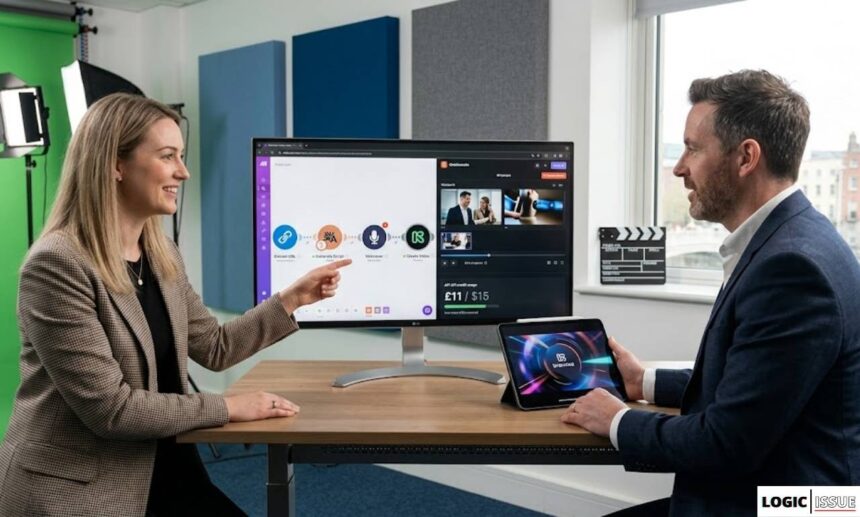
The first time I ran our URL-to-video pipeline for a client in Dublin, we both watched a 60-second cinematic product ad generate itself in under four minutes. The client had just described their previous production process: three weeks of coordination, a freelance crew, and a £4,200 invoice for a single 90-second brand video.
We had just replaced that with a Make.com scenario, a Runway API call, and an AI voiceover. The resulting ad was not perfect. It needed one round of human review and a minor edit to the thumbnail. It was, however, completely viable for paid social — and it cost £11 in API credits.
That 97% cost reduction is not unique to this client. AI video tools now cost between $2 and $30 per finished minute on subscription plans, while traditional production ranges from $1,000 to $5,000 per minute for freelance work — representing a cost reduction of 97–99.9% depending on complexity. For agencies, this is not a marginal efficiency gain. It is a fundamental restructuring of the economics of video production.
This guide is the complete playbook for building AI video automation systems, offering them as a client service, and positioning your agency to capture a share of a market that is growing at a pace very few industries have ever seen.
The AI Video Market in 2026: Why This Matters Right Now
The numbers behind AI video adoption in 2026 are not gradual. They are structural.
The AI video generator market reached $716 million in 2025 and is projected to hit $3.35 billion by 2034, growing at 18.8% CAGR. More immediately relevant: the global AI video generation market is projected to reach $18.6 billion by the end of 2026, growing at a 34% CAGR.
91% of businesses now use video as a marketing tool in 2026, returning to joint all-time highs according to Wyzowl’s annual survey. Of those, 63% have incorporated AI tools into their video creation workflow. The remaining 37% represent the next wave of adoption — businesses that have not yet automated their video production but will face competitive pressure to do so within the next 12 months.
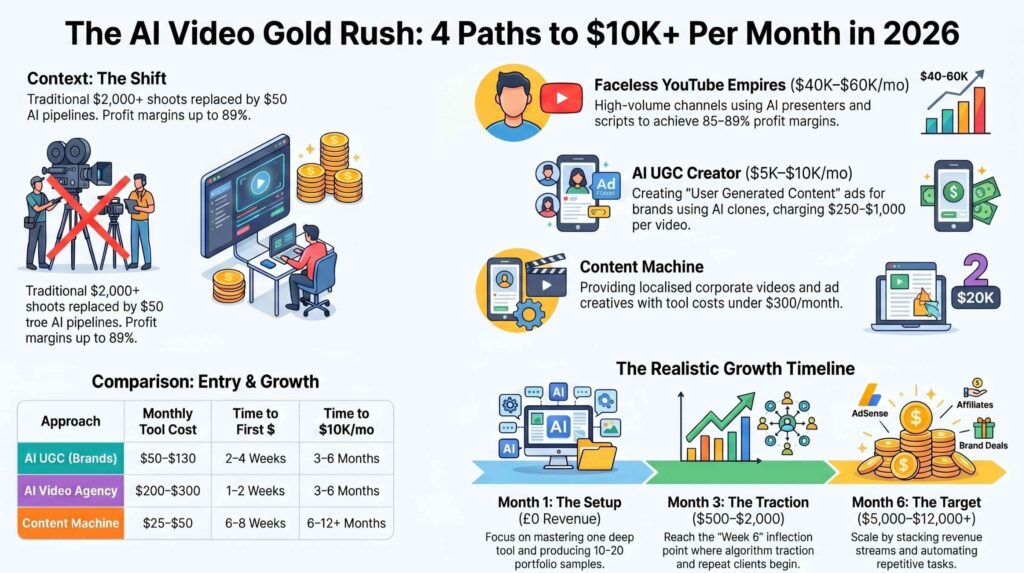
The production efficiency data is equally striking. Average time to produce a 60-second marketing video dropped from 13 days with traditional methods to 27 minutes with AI tools. Furthermore, agencies that have integrated AI video tools into their workflows produce 11 times more video content per month without expanding their teams.
For agencies specifically, this creates two simultaneous opportunities. You can use AI video automation internally to deliver more video content to existing clients at higher margins. Simultaneously, you can offer AI video automation as a managed service — building and operating video pipelines for clients who want the output but not the technical complexity of running the system themselves.
At Logic Issue, our AI video automation service is built on exactly this dual model. We use the same pipeline infrastructure internally that we deploy for clients. This guide documents that infrastructure in full.
Understanding AI Video Automation: What It Is and What It Is Not
Before building anything, it is essential to be clear about what AI video automation actually means in 2026 — because the term covers a wide range of capabilities with very different use cases and output quality levels.
What AI Video Automation Is
AI video automation is the use of artificial intelligence tools — connected through automation platforms like Make.com or n8n — to perform video production tasks that previously required human time, specialist software, and creative direction. These tasks include script generation, voiceover production, visual asset creation, video editing, format adaptation, and multichannel publishing.
The key word is “automation.” A single person manually using an AI video tool is not video automation. True AI video automation is a pipeline: a connected workflow that receives an input (a URL, a brief, a product listing, a blog post, or a keyword), executes a series of AI-powered production steps, and outputs a finished or near-finished video — without requiring a human operator at each intermediate stage.
What AI Video Automation Is Not
AI video automation is not a replacement for creative strategy, brand direction, or senior production judgment. The most effective AI video pipelines in 2026 use AI to handle the technically repetitive elements of video production while keeping human creative oversight at the strategic level. The most successful marketing departments in 2026 are those that have successfully paired human Creative Leads with AI Prompt Engineers.
Furthermore, AI video automation is not yet suitable for every video use case. High-stakes brand films, celebrity endorsement content, narrative documentaries, and videos requiring actors, physical locations, or studio-quality audio still benefit substantially from human production. The sweet spot for AI video automation in 2026 is high-volume, platform-specific content — product ads, social clips, explainer videos, testimonial-style content, educational videos, and personalised outreach.
2026 AI Marketing and Video Service Pricing Benchmarks
The cost of AI implementation in 2026 is no longer tied to manual labor hours, but to “Output Velocity” and “System Complexity.” Whether deploying a proprietary YouTube automation pipeline or an enterprise-grade multi-agent workflow, understanding the pricing models—from performance-based bonuses to flat-rate retainers—is essential for calculating your automation ROI. The following table breaks down the current market rates for top-tier AI services.
| Service / Tool | Category | Pricing Model | Est. Cost (USD/mo) | Typical Output | Primary Use Case |
|---|---|---|---|---|---|
| AI Channel Empire | AI Video | Performance + Bonus | $6,700 | 5+ Active Channels | Passive Income / Documentaries |
| AI SEO Services | AI SEO | Flat Retainer | $2,000 – $20,000 | High-velocity content | SERP Domination / Automation |
| AI Automation Builds | Development | Setup + Usage | $2,500 – $15,000+ | Custom Pipelines | Enterprise Decision Paths |
| YOPRST Studio | AI Video | Project Fees | $1,000 – $10,000 | Bespoke Production | Cinematic / Music Videos |
| AI UGC Creator | Video Ads | Per Video / Project | $250 – $1,000 | 20 – 40 Videos/mo | DTC Brand Social Growth |
| AI Consulting | Consulting | Hourly / Retainer | $100 – $450 /hr | Strategy & Audits | Workflow Adoption & Training |
| DubVid | Localization | Usage (Tokens) | $0.30 /min | Parallel Cataloging | Global Scaling / Bulk Dubbing |
| FluxNote | YouTube Tool | Monthly Flat | $9.99 | 21 Videos/mo | Faceless Social Content |
The Six Types of AI Video Automation Pipelines
Different business needs require different pipeline architectures. These are the six production pipeline types that agencies build most frequently in 2026.
Pipeline Type 1 — URL to Cinematic Ad
This is the flagship pipeline — the one that most dramatically demonstrates the commercial potential of AI video automation. The input is a single URL: a product page, a landing page, or a blog post. The pipeline extracts the key content from that URL, generates a marketing script, creates a voiceover, sources or generates visual assets, combines them into a structured video, and exports a platform-optimised ad.
Our detailed tutorial on this exact architecture — the AI video automation pipeline that turns URLs into cinematic ads — documents every module and API connection in the Make.com build. For e-commerce clients and marketing agencies, this pipeline alone represents an entirely new service offering.
Pipeline Type 2 — Blog Post to Video
This pipeline converts written content into video format. A blog post URL or a Google Doc feeds into the pipeline, which extracts the key points, restructures them as a video script, generates a voiceover, creates visual slides or B-roll clips, and exports a structured explainer video.
For content marketing agencies and SEO-focused businesses, this pipeline dramatically extends the value of existing written content. A 2,000-word blog post can become a 4-minute YouTube explainer, three 60-second social clips, and a 30-second Reels teaser — all from the same source material, in under 30 minutes of automated processing.
This pipeline integrates directly with the AI-powered SEO automation content engine we deploy for content-heavy clients. Articles produced by the AI writing pipeline automatically feed the video pipeline, creating a compound content asset from each published piece.
Pipeline Type 3 — Social Video Factory
This pipeline is purpose-built for high-volume short-form social content. The input is a content brief, a campaign theme, or a list of product features. The pipeline generates multiple script variations, creates a voiceover for each, applies brand templates and visual styles, exports in multiple platform formats (9:16 for Reels and TikTok, 1:1 for Instagram feed, 16:9 for YouTube), and schedules publication across connected social accounts.
Short-form vertical video under 60 seconds and in 9:16 format delivers the highest engagement rates — 2.5 times more than long-form content. For social media agencies, a social video factory pipeline transforms weekly output from 2–4 videos to 20–40 videos with the same team headcount.
Pipeline Type 4 — Personalised Video Outreach
This pipeline generates individually personalised videos at scale for sales and marketing outreach. The input is a CRM contact list with personalisation fields — name, company, specific pain point, or recent trigger event. The pipeline generates a unique script for each contact, creates a video using an AI avatar with the contact’s name and company referenced directly, and sends the personalised video via email or LinkedIn.
Real estate agencies using AI video walkthroughs report 2.4 times more inquiries per listing. The same personalisation principle applies to B2B outreach — a video that addresses a prospect by name and references their specific business context generates dramatically higher response rates than a generic video or a text email.
This pipeline integrates directly with the AI lead intelligence and CRM automation infrastructure we build for clients. High-scoring leads from the qualification pipeline automatically trigger personalised video outreach as part of the follow-up sequence.
Pipeline Type 5 — AI Avatar Training and Deployment
This pipeline creates a reusable AI avatar — a digital spokesperson trained on video recordings of a real person — that can generate new video content without that person being on camera. The avatar speaks new scripts in the original person’s voice and visual likeness, with natural lip sync and expression variation.
For founders, executives, and thought leaders who want to produce consistent video content without scheduling recurring filming sessions, an AI avatar pipeline is transformative. A single four-hour recording session produces an avatar that can generate unlimited future videos. Platforms like Heygen and Synthesia have made this capability available through API, making it fully automatable within a Make.com or n8n workflow.
Pipeline Type 6 — Video Localisation and Translation
This pipeline takes existing video content and automatically produces localised versions for multiple languages and markets. The AI transcribes the original video, translates the script, generates a voiceover in the target language using a voice matched to the original speaker’s tone, and applies AI lip sync to the existing video footage.
AI video localisation costs an average of $0.12 per second, versus $8–$15 per second for human dubbing. For global brands and internationally distributed content, this pipeline compresses a process that previously required weeks and significant budget into an automated overnight job.
The AI Video Automation Tech Stack for Agencies
No single tool covers the entire video production pipeline. Effective AI video automation uses specialised tools at each production stage, connected through an automation platform. The stack below is what Logic Issue uses in production for client engagements.
The Complete AI Video Production Stack
| Stage | Tool | Function | Monthly Cost |
|---|---|---|---|
| Automation orchestration | Make.com | Connect all tools, manage pipeline flow | $10.59–$20.69 |
| Script generation | Claude API (Anthropic) | Generate video scripts from input content | $15–$60 usage |
| Web content extraction | ScrapingBee or Firecrawl | Extract content from URLs for pipeline input | $49–$99 |
| Text-to-video (cinematic) | Runway Gen-3 Alpha | Cinematic footage generation from text/image | $15–$95 |
| Text-to-video (structured) | Pika Labs 2.2 | Product and motion-focused video generation | $8–$70 |
| AI voiceover | ElevenLabs API | Natural AI voice generation, voice cloning | $22–$99 |
| AI avatar video | Heygen API | Avatar-based spokesperson video generation | $29–$89 |
| Video editing/assembly | Creatomate API | Programmatic video editing and rendering | $29–$99 |
| Subtitles/captions | AssemblyAI or Whisper API | Automatic transcription and caption generation | $10–$40 |
| Format optimisation | FFmpeg (via Make.com) | Video format conversion and resizing | Free |
| Thumbnail generation | DALL-E 3 or Midjourney API | AI thumbnail and cover image creation | $10–$30 |
| Social scheduling | Buffer or Hootsuite API | Automated multichannel publishing | $18–$80 |
Total estimated stack cost for a production agency pipeline: $220–$780 per month
The critical design principle for this stack is to use APIs rather than browser-based tools wherever possible. Manual browser-based tools cannot be automated. Every tool in a real video automation pipeline must expose an API that Make.com or n8n can call programmatically. When evaluating any new tool, confirm API availability before committing to it as part of your pipeline architecture.
For the agentic orchestration layer that sits above this stack — particularly for complex multi-step pipelines requiring adaptive decision-making — see our Agentic AI Workflows Master Guide.
Building a URL-to-Video Pipeline in Make.com: Step-by-Step
This is the complete build for the pipeline that converts any URL into a finished video ad. It is the same architecture documented in our AI video automation pipeline tutorial, presented here as a complete overview.
Step 1 — Trigger: Receive the URL Input
The pipeline starts with a webhook trigger in Make.com. A form on your website or a connected CRM field sends the product URL, target platform, and any campaign brief notes to the webhook when a new video request is created. Alternatively, a Google Sheet row with status “Approved” can trigger the scenario automatically as part of a larger content production workflow.
Step 2 — Extract Content from the URL
An HTTP Request module calls the ScrapingBee or Firecrawl API with the product URL. This returns the page title, product description, key features, pricing, and any existing marketing copy as structured text. This content becomes the raw material for the script generation step. Good content extraction is the most important step — garbage in, garbage out applies to every subsequent production stage.
Step 3 — Generate the Video Script
The extracted content passes into a Claude or GPT-4o module. The system prompt instructs the AI to act as a senior video scriptwriter and produce a structured script in a defined format: hook (first 3 seconds, designed to stop the scroll), problem statement (seconds 4–8), solution reveal (seconds 9–20), proof point (seconds 21–35), and call to action (seconds 36–45 or 60, depending on target length).
The script output is structured as a JSON object with separate fields for voiceover text, on-screen text overlays, visual direction notes for each segment, and the recommended platform format. This structured output is essential — every subsequent module reads specific fields from this JSON rather than trying to parse unstructured text.
Step 4 — Generate the AI Voiceover
The voiceover_text field from the script JSON passes into the ElevenLabs API module. You specify the voice ID (pre-selected to match the client’s brand voice), the stability and similarity settings that control how natural and consistent the voice sounds, and the output format (MP3 at 44.1kHz for maximum compatibility). ElevenLabs returns an audio file URL that is saved to a cloud storage location for use in the assembly step.
For clients who have provided a voice recording for cloning, ElevenLabs’ voice cloning API can use that recording to generate a custom voice model. Once created, this voice model persists and can be called in any subsequent video production without additional setup.
Step 5 — Generate Visual Assets
The visual direction notes from the script JSON feed into the Runway Gen-3 API module. For each segment of the script, a separate Runway call generates a 3–8 second video clip matching the visual description. These clips are generated in parallel using Make.com’s iterator module — each script segment spawns a simultaneous Runway API call, reducing total generation time by 60–70% compared to sequential generation.
For product-specific imagery where the client has existing photography, the Runway image-to-video API extends static product images into short motion clips, adding natural camera movement and environmental depth without requiring new footage.
Step 6 — Assemble the Final Video
The generated video clips and the voiceover audio file pass into the Creatomate API. Creatomate is a programmatic video editing platform that accepts a JSON template specifying which video clips appear in which sequence, what text overlays to apply (from the on-screen text fields in the script JSON), where to place the voiceover audio track, what transitions to use between segments, and what format and resolution to export.
This step is the orchestration layer of the entire pipeline. A well-designed Creatomate template means that any script, any set of video clips, and any voiceover audio will always produce a consistently formatted, on-brand output. The template encodes your brand guidelines — colours, fonts, logo placement, motion style — permanently, so every video automatically matches brand standards without manual adjustment.
Step 7 — Generate Captions and Thumbnails
The finished video file passes through the AssemblyAI API to generate accurate captions, which are returned as an SRT file. A separate DALL-E 3 API call generates a thumbnail using the product name and key visual direction notes as the prompt. Both assets are stored alongside the video file.
Step 8 — Quality Check and Human Review Gate
Before any video reaches a client or goes live on social media, a human review step is mandatory. Make.com sends a Slack message to the review channel with the video file, caption file, and thumbnail attached, alongside the original brief and any campaign notes. The reviewer watches the video, confirms it meets quality and brand standards, and approves it with a thumbs-up reaction or flags it for revision with a comment.
This human gate is not optional. It is the mechanism that protects your agency’s reputation and your client’s brand. AI video generation is fast and impressive — it is not infallible. Occasional visual anomalies, awkward phrasing, or off-brand moments slip through. Human review catches these before they cause problems.
Step 9 — Publish and Track
On approval, Make.com calls the Buffer or Hootsuite API to schedule the video for publication across the specified channels. The video URL, platform, publication date, and campaign attribution are written to a Google Sheet or CRM record for performance tracking. A final Slack notification confirms the video is scheduled and provides the publication timestamp.
The entire pipeline, from URL input to scheduled publication, runs in approximately 8–15 minutes for a 45–60 second video. With human review included, typical same-day turnaround is consistently achievable.
For lead generation campaigns using these videos, connecting the video pipeline output to the AI lead automation pipeline creates a fully integrated marketing and sales system — video generates leads, automation qualifies them.
Offering AI Video Automation as a Client Service
The commercial structure for offering AI video automation to clients follows the same three-tier model we use across our AI workflow automation services.
Service Tier 1 — Done-For-You Video Production (Retainer)
You operate the video pipeline on behalf of the client. They provide campaign briefs, product URLs, and creative direction. You deliver finished videos on a defined schedule. The client never touches the technology.
Price range: $1,500–$4,500 per month Typical deliverables: 8–20 videos per month depending on length and format Production cost to agency: $150–$400 in API costs for this volume Gross margin: 70–90%
This model is most appropriate for marketing agencies, e-commerce brands, and content-heavy businesses that want high video output without building internal production capability. The retainer structure creates predictable recurring revenue and a natural expansion path as the client increases their video volume.
Service Tier 2 — Pipeline Build and Handover (Project)
You build a custom video automation pipeline configured specifically for the client’s brand, tools, and workflow. You document it, train their team on operating it, and hand it over for self-management. Optional ongoing support retainer for monitoring and optimisation.
Price range: $3,500–$12,000 one-time build fee Ongoing support retainer: $500–$1,500 per month (optional) Best for: Larger marketing teams, content agencies with internal technical capability, brands wanting full ownership of their production infrastructure
Service Tier 3 — AI Video Strategy and Implementation (Enterprise)
Full-scope engagement covering video strategy, pipeline architecture, tool selection, pipeline build, team training, and 90-day performance optimisation. Typically includes multiple pipeline types (URL-to-ad, social factory, avatar creation, and localisation) and integration with the client’s existing marketing automation stack.
Price range: $8,000–$25,000 implementation fee, $2,000–$6,000 per month ongoing
Client Acquisition for AI Video Services
The most effective acquisition channel for video automation clients is demonstration. Nothing sells AI video automation like watching a pipeline produce a video in real time. For every sales conversation, build a live demo using the prospect’s own website URL as the input. Show them their own product in a generated video ad within 15 minutes of the conversation starting. This demonstration closes more deals than any proposal document.
Additionally, posting short-form behind-the-scenes content on LinkedIn — showing the pipeline running, showing the before-and-after of a traditional brief versus the AI output, sharing the cost comparison data — attracts inbound interest from marketing teams actively researching AI video solutions.
For building the content strategy that supports this visibility, our AI-powered SEO automation guide covers the content pipeline architecture. Our agentic AI workflows guide covers the advanced pipeline patterns for complex multi-platform video automation.
Runway AI: The Cornerstone of Cinematic Video Generation
Of all the AI video generation tools available in 2026, Runway’s Gen-3 Alpha model produces the highest quality cinematic output for agency-standard video production. Our detailed guide on Runway AI as a video generator covers the full capability overview.
For pipeline integration specifically, Runway’s API allows programmatic video generation with text prompts, image-to-video extension, and motion control parameters that significantly influence the style and movement of generated clips. In a Make.com pipeline, the Runway API is called via the HTTP Request module with a JSON body specifying the prompt, duration (4 or 8 seconds in Gen-3), aspect ratio, and any reference image URL for image-to-video generation.
Runway Pricing in Agency Pipeline Context
| Plan | Monthly Cost | Credits Included | Minutes of Video | Per-Minute Rate |
|---|---|---|---|---|
| Standard | $15/month | 625 | ~52 min | $0.29/min |
| Pro | $35/month | 2,250 | ~187 min | $0.19/min |
| Unlimited | $95/month | Unlimited | Unlimited | $0 (fair use) |
| Enterprise | Custom | Custom | Custom | Negotiated |
For agencies producing 15–30 client videos per month, the Pro plan at $35 per month provides sufficient credits for most standard production volumes. For high-volume pipelines producing 50+ videos monthly, the Unlimited plan at $95 per month makes the per-video cost negligible.
One critical operational note: Runway’s API has rate limits at lower tiers. For pipelines with simultaneous requests — generating clips for multiple script segments in parallel — monitor your API rate limits carefully and implement retry logic in Make.com’s error handling modules. Without this, parallel generation requests at high volume will occasionally fail silently, breaking the pipeline mid-execution.
Quality Control in AI Video Pipelines
The most common failure mode in production AI video pipelines is not the AI producing bad output — it is the pipeline producing inconsistent output without any systematic quality check catching the variation before delivery.
Three quality control mechanisms should be built into every production AI video pipeline.
Prompt consistency templates. The visual direction prompts that feed your video generation API should be stored as templates with defined variable slots — never generated fresh from scratch for each video. Consistent prompt structure produces consistent visual output. Random variation in prompt phrasing produces random variation in output quality.
Brand style reference images. Runway and similar platforms support image-to-video generation where a reference image constrains the visual style of generated output. For each client, create a library of brand-style reference images — colour palette, composition style, visual tone — and include the most relevant reference in every generation call. This dramatically reduces the frequency of off-brand outputs.
Automated output validation. Before the video file reaches the human review step, an automated module checks that the file has been generated successfully (file size above a minimum threshold confirms generation completed rather than failing silently), that the duration is within the expected range, and that the audio track is present and properly synchronised. Files that fail any check trigger an automatic error notification to the Slack review channel with the specific failure reason.
For the complete technical architecture of error handling in Make.com pipelines, the patterns described in our Ultimate Make.com Automation Guide apply directly to video pipeline error handling.
AI Video Automation for Specific Industries
While AI video pipelines work for virtually any business using video marketing, certain industries see disproportionately high ROI from automated video production.
E-Commerce
E-commerce brands produce product videos at the highest volume of any industry. Every product listing, every promotional campaign, every seasonal sale, and every new arrival benefits from video content. An AI video pipeline that takes product page URLs as input and outputs formatted product ads for Meta, Google, TikTok, and email is immediately valuable for any e-commerce operation with more than 50 SKUs.
The workflow integrates naturally with the Facebook Lead Ads to CRM automation pipeline. Video ads generate leads, lead automation qualifies and follows up — creating a closed-loop marketing and sales system.
Marketing Agencies
Marketing agencies have the most to gain from AI video automation and the most to lose by ignoring it. By automating the most labour-intensive parts of video production, marketing teams can reduce their external agency spend by up to 60%. For agencies that do not build AI video capability, this means clients will find cheaper, faster alternatives. For agencies that do build it, it means delivering ten times the video output at dramatically higher margins.
The social video factory pipeline is the most relevant architecture for marketing agencies — producing platform-specific content at scale for multiple clients simultaneously from a single pipeline instance.
Real Estate
Real estate agencies using AI video walkthroughs report 2.4 times more inquiries per listing. A pipeline that takes property listing data and images as input and outputs a professional property showcase video — with AI voiceover, music, text overlays, and local area context — represents an immediately deployable service for any real estate agency.
Professional Services and B2B
For law firms, consultancies, financial advisors, and B2B technology companies, the personalised video outreach pipeline generates dramatically higher engagement than traditional cold email. A 90-second video that addresses a prospect by name, references their company’s specific situation, and explains clearly how a particular service addresses their problem routinely achieves reply rates 4–6 times higher than equivalent text emails.
This pipeline integrates directly with the AI lead qualification system — high-scored leads automatically trigger a personalised video outreach video rather than a standard email.
Personal Experience: What Running a Client Video Pipeline for 12 Months Taught Us
After 12 months of running AI video pipelines for clients across Dublin, Pakistan, and the UK, the operational insights that matter most have become clear.
The biggest ROI driver is not the video generation itself — it is the format automation. Converting a single video into every required platform format (landscape YouTube, square LinkedIn, vertical Reels, story format) previously required hours of manual editing per video. A Creatomate template handles all format variants from a single source video in under three minutes. For clients running video across four or more platforms, this format automation alone justifies the entire pipeline cost.
The most common client request after seeing the first pipeline delivery is personalisation at scale. Once a client understands that every lead in their CRM can receive an individually personalised video mentioning their name, company, and specific situation — generated automatically within minutes of lead capture — they immediately want to implement it. The personalised video outreach pipeline has become our highest-demand new build.
The quality threshold matters more than speed. It is tempting to optimise the pipeline for minimum generation time. In practice, a pipeline that takes 20 minutes but produces consistently professional output retains clients far more effectively than a pipeline that produces output in 5 minutes with inconsistent quality. Invest in prompt engineering and template quality first. Optimise for speed second.
AI video automation does not eliminate the need for creative strategy. The pipeline can generate the video. It cannot determine whether the creative strategy behind the video is sound. The agencies that deliver the most client value are those that pair a strong AI production pipeline with genuine understanding of what kind of video content drives results for each specific client context. The tool is powerful. The strategy still requires human intelligence.
If you want Logic Issue to build an AI video automation pipeline for your business or agency, explore our AI video automation service or contact us directly. For agencies looking to add video automation to their service offering, our partner programme covers the delivery model and referral structure.
Frequently Asked Questions

What is AI video automation and how does it work for agencies?
AI video automation is the use of connected AI tools — script generators, text-to-video models, AI voiceover platforms, and programmatic video editors — orchestrated through an automation platform like Make.com to produce finished videos from structured inputs without manual production work at each stage. For agencies, this means receiving a URL, a product brief, or a campaign theme as input and delivering a formatted, branded video ready for publishing — in minutes rather than days, and at a fraction of traditional production costs.
Which AI video tools are best for building automated pipelines in 2026?
The most effective stack for agency-grade automated video production in 2026 combines Runway Gen-3 Alpha for cinematic video generation, ElevenLabs for natural AI voiceover, Heygen for AI avatar spokesperson videos, Creatomate for programmatic video assembly and formatting, and Make.com as the orchestration layer connecting all tools. Each tool must have an accessible API — browser-only tools cannot be integrated into a programmatic pipeline.
How much does it cost to run an AI video automation pipeline?
A full production pipeline running on the stack described in this guide costs approximately $220–$780 per month in tool subscriptions. At a production volume of 20–40 videos per month, the per-video cost in tool expenses ranges from approximately $5 to $25 — compared to $500 to $5,000 per video for traditional production. For agencies charging clients $1,500–$4,500 per month for video production retainers, the gross margin on AI-automated video is consistently 70–90%.
Can AI-generated videos match the quality of traditional video production?
For the majority of commercial video use cases in 2026 — social media ads, product explainers, personalised outreach, platform content, and educational videos — AI-generated video quality is sufficient for professional commercial deployment. The quality gap with traditional production persists for high-production-value brand films, complex narrative content, and any video requiring real human presence, physical locations, or studio-quality acoustic environments. For these use cases, AI tools are most valuable in the pre-production and post-production stages rather than as the primary production method.
How do I sell AI video automation services to clients?
The most effective sales approach for AI video automation is live demonstration. Use the prospect’s own product or service URL as the input and show them their own video ad generated in real time during the sales conversation. No proposal document has the persuasive impact of watching the pipeline produce a viable video from the client’s own content in under 15 minutes. Price the service based on the volume of videos delivered per month, not the hours spent — because the hours shrink dramatically as the pipeline matures, while the value delivered to the client remains constant.
What to Read Next
These Logic Issue resources build directly on the concepts covered in this guide:
- AI Video Automation Pipeline: URL to Cinematic Ad — Complete Tutorial
- Runway AI Video Generator: The Future of Production
- AI Video Automation Service — Logic Issue
- Ultimate Make.com Automation Guide 2026
- Agentic AI Workflows Master Guide 2026
- AI-Powered SEO Automation Complete Guide 2026
- Complete Guide to AI Lead Automation 2026
- How to Start an AI Automation Agency 2026
- Automate Facebook Lead Ads to CRM with Make.com
- Automate Lead Qualification with AI
- Workflow Automation Case Studies — Real Client Results
- Partner With Us — White-Label and Referral Programme
- Contact Logic Issue
This guide is written by the Logic Issue automation team, based on 12 months of hands-on AI video automation pipeline deployment for clients in Dublin, Ireland, Pakistan, the UK, and internationally. We update this article as video generation models, API capabilities, and production economics evolve.