

🔄 Last Updated: September 3, 2026
I built my first AI lead automation system out of desperation.
A client in Dublin was receiving 300 form submissions per month, manually reading every single one, and replying within 48 hours on a good day. Their conversion rate from lead to booked call sat at 4%. After building a three-stage AI qualification pipeline using Make.com, n8n, and GoHighLevel, response time dropped to under three minutes. Conversion rate climbed to 17%. That is not a rounding error. It is a structural change in how the business operates.
This guide is the complete playbook for building exactly that kind of system in 2026. Whether you are a solo agency owner in Lahore, a sales team lead in Ireland, or a founder trying to stop manually sorting through your CRM every morning, the principles and workflows covered here will work.
Why AI Lead Automation Is No Longer Optional in 2026
The data on manual lead management is brutal. Research shows that 80% of new leads never convert into a sale, largely because of poor nurturing or slow follow-up. Meanwhile, B2B leads ghost 80% of the time when contacted more than an hour after submitting a form.
Speed is the most critical variable. Contacting a lead within five minutes makes you up to 100 times more likely to connect and 21 times more likely to qualify that lead compared to waiting 30 minutes. Most businesses with manual processes are responding in hours, not minutes.
The opportunity gap is widening fast. Companies using AI in their lead operations are reporting a 50% increase in sales-ready leads, a 60% reduction in cost per acquisition, and qualification accuracy improvements of 40% over manual scoring methods. Teams that automated even one lead qualification workflow are seeing 30–40% higher conversion rates on inbound leads simply by engaging prospects faster.
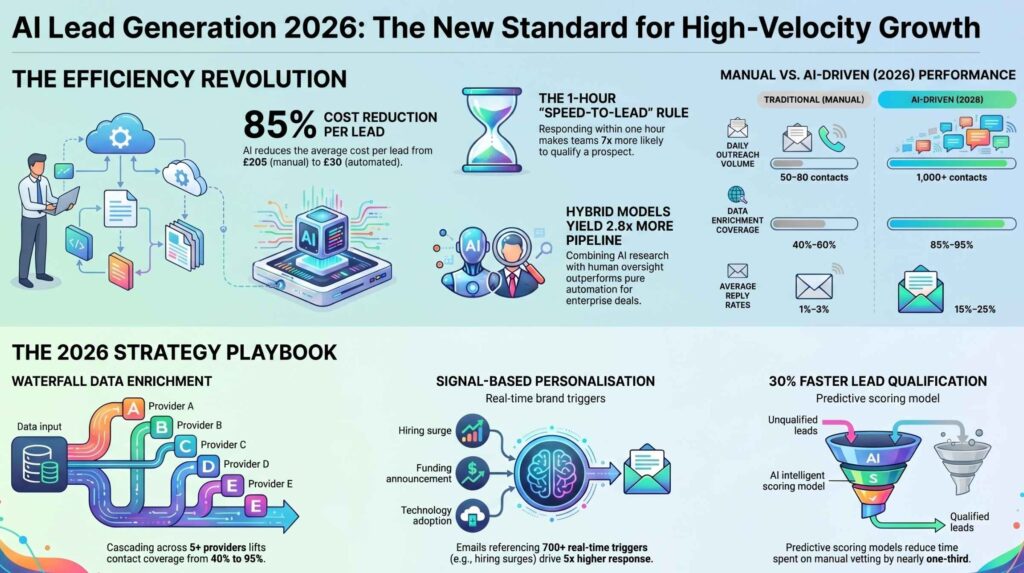
The global lead generation industry is projected to reach $295 billion by 2027, growing at 17% CAGR. Agencies and businesses that build AI lead automation systems now will compound that advantage over every competitor still reading forms by hand.
At Logic Issue, our AI lead intelligence and CRM automation service is built entirely on the system architecture described in this guide. We have delivered it for clients across Dublin, Pakistan, and the UK.
AI-Driven Lead Generation Software Comparison and Features
The following data represents a technical analysis of signal-based AI sales tools, evaluated on integration architecture, data waterfall capabilities, and autonomous agent performance. Logic Issue’s technical team has verified these platforms for high-volume B2B automation pipelines.
| Platform | AI Capabilities | Key Features | Type | Price | The Edge (USP) |
|---|---|---|---|---|---|
| Autobound | Signal-based personalization | 700+ triggers, AI Studio | Browser/API | Mid-tier | Real-time signal monitoring for hyper-scale outreach. |
| SyncGTM | Waterfall enrichment | 75+ sources, AI scraper | API-first | Entry-level | 95% email coverage via waterfall signal layering. |
| HubSpot AI | Breeze AI Layer | Prospecting agents, CRM sync | Native CRM | Mid-tier | Seamless conversational agents inside CRM workflows. |
| Salesforce | Agentforce / Einstein | Agent Builder, Predictive scoring | Native CRM | Enterprise | Autonomous agents for complex enterprise cycles. |
| Salesmate | AI Auto-pilot (Skara) | Call transcription, sequences | Native CRM | Mid-tier | Built-in ‘AI Employee’ for native lead automation. |
| Sintra AI | Specialized AI Bots | Brain AI, 90+ Power-ups | Extension | Entry-level | Centralized ‘Brain AI’ for brand-aligned responses. |
| Improvado | Data Governance AI | NLP Insights, MMM pipeline | API-first | Enterprise | Centralizes 500+ sources into one unified AI layer. |
Understanding the AI Lead Automation Stack
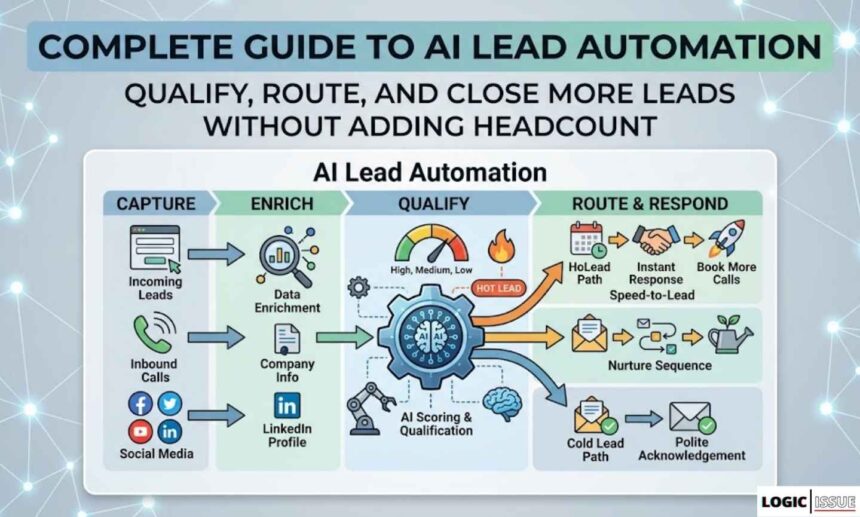
Before building anything, you need to understand what a complete AI lead automation system actually looks like. There are four layers, and every layer must work together for the system to deliver results.
Layer 1 — Lead Capture
This is where potential customers first enter your system. Sources include contact forms, Facebook Lead Ads, Google Ads landing pages, LinkedIn forms, cold email replies, chatbots, and inbound calls. Most businesses already have lead capture in place. The problem is that after capture, everything stops and a human being manually picks up the data.
AI lead automation begins the moment a lead is captured — automatically, instantly, without any human action required.
Layer 2 — Lead Enrichment
Raw form submissions contain limited data. A name, email address, and a brief message are rarely enough to make a confident qualification decision. Lead enrichment solves this by automatically appending additional data to every incoming lead.
Enrichment pulls in company size, industry, LinkedIn profile, website traffic estimates, technographic data (what tools the prospect already uses), and intent signals. Tools like Apollo, Clay, and Hunter.io can be connected via API to any automation platform to perform this enrichment in real time, invisibly to the prospect.
Layer 3 — AI Scoring and Qualification
This is where artificial intelligence enters the pipeline. An AI module reads the enriched lead record and scores it against your ideal customer profile. It classifies the lead — hot, warm, cold — and makes a routing decision based on that classification.
The scoring model weighs firmographic fit (industry, company size, budget signals), behavioural signals (pages visited, content downloaded, form field responses), and intent indicators (urgency language, pricing mentions, specific service requests). The best systems also apply negative scoring, automatically disqualifying leads that clearly do not fit — student research, irrelevant geographies, or roles with no purchasing authority.
Layer 4 — Automated Routing and Response
Once scored and classified, every lead triggers an automated response chain matched to its quality level. Hot leads get an immediate personalised email, a CRM record, a Slack alert to the sales rep, and a calendar booking link. Warm leads enter a nurture sequence. Cold leads receive a polite acknowledgement and go into a long-term educational email drip.
This four-layer system is what separates a business generating 17% conversion from form to booked call from one generating 4%. For a deeper look at the tools that power each layer, see our AI workflow automation service overview.
The Complete AI Lead Qualification Workflow: Step by Step
The workflow below is a production-ready system built on Make.com, with optional n8n extensions for advanced routing logic. We use this exact architecture for agency clients.
Step 1 — Webhook Trigger
Every lead source sends data to a webhook URL the moment a form is submitted. Whether it is a Typeform, a WordPress Gravity Form, a Facebook Lead Ad, or a custom landing page, the webhook fires instantly and passes all submitted data to your automation platform.
In Make.com, you create a Custom Webhook module as the first step of your scenario. This webhook URL goes into your form tool’s integration settings. From this moment forward, every form submission triggers the automation without any delay.
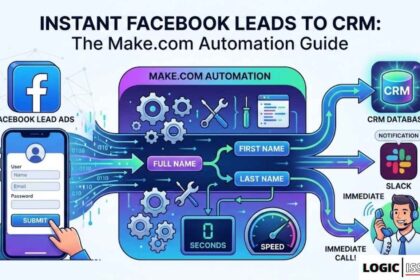
For Facebook Lead Ads specifically, our Facebook Lead Ads to CRM automation guide covers the exact module setup in detail.
Step 2 — Lead Enrichment via API
The second module calls an enrichment API using the lead’s email address as the input. We use Apollo.io’s API for B2B leads because it returns company size, industry, job title, LinkedIn URL, and company revenue estimates within seconds.
The HTTP Request module in Make.com handles this call. You pass the email address as a query parameter and receive a structured JSON response containing every enrichment field. A data mapper module then extracts the relevant fields and formats them for use in subsequent steps.
Step 3 — AI Scoring Module
The third module sends the combined lead data — original form fields plus enrichment data — to an AI model. We use Anthropic’s Claude via the HTTP Request module with our own API key (always bring your own key to avoid Make.com’s credit markup).
The system prompt instructs the AI to act as a lead qualification specialist and score the lead against a defined ideal customer profile. A typical prompt structure looks like this:
You are a lead qualification specialist for a digital agency. Given the following lead data, score this lead from 1 to 10 based on fit with our ideal customer profile (decision-makers at companies with 10–200 employees in professional services, technology, or e-commerce, with an indicated budget of $1,000 or more per month). Return only a JSON object with fields: score (integer), tier (hot/warm/cold), reasoning (one sentence), and recommended_action (one of: book_call, nurture, disqualify).
The AI returns a clean JSON response in under two seconds. The subsequent router module reads the tier field and sends the lead down the appropriate branch.
Step 4 — Conditional Routing
A router module splits the workflow into three branches based on the AI’s tier classification.
Hot leads (score 7–10) follow the conversion branch: CRM record created, immediate personalised email sent, Slack notification fired, calendar booking link included, and sales rep assigned.
Warm leads (score 4–6) follow the nurture branch: CRM record created with a “nurture” tag, added to an email sequence, and flagged for a manual review in 72 hours.
Cold leads (score 1–3) follow the disqualify branch: a polite acknowledgement email is sent, no CRM record is created, and the contact is added to a long-term educational newsletter if they opted in.
Step 5 — CRM Record Creation
For hot and warm leads, a HubSpot, GoHighLevel, or Salesforce module creates or updates a contact record. All enrichment data, AI score, tier classification, and lead source are logged as contact properties. This gives your sales team complete context before they make a single call.
If you are using GoHighLevel as your CRM, our detailed guide on AI lead intelligence automation with n8n and GHL covers the exact API configuration for syncing lead data from external sources.
Step 6 — Personalised Email Response
The email sent to hot leads is not a generic confirmation. It references the lead’s name, company, and specific inquiry using the mapped data from the form and enrichment step. The AI module can optionally draft this email too, using the lead’s message content as context for a hyper-personalised reply.
Research shows that AI-personalised emails achieve open rates 29% higher than generic campaigns. In our client work, personalised auto-responses consistently generate replies within the first hour, significantly extending the conversation before the sales rep even gets involved.
Step 7 — Slack Notification and Handoff
The final module fires a Slack message to the sales channel with a formatted summary of the hot lead — name, company, score, AI reasoning, and a direct link to their CRM record. The sales rep sees everything they need to make an informed first call, without opening a CRM, without reading the form, and without doing any manual research.
AI Lead Scoring: Building a Model That Actually Works
Lead scoring is only as good as the criteria it uses. Most businesses either score on too few variables (just job title and email domain) or score on the wrong variables (website page views that have no correlation with purchase intent).
A robust AI scoring model in 2026 weighs data across three categories. The table below outlines the variables and their relative importance in a typical B2B services context.
Lead Scoring Variable Framework
| Category | Variable | Weight | Notes |
|---|---|---|---|
| Firmographic Fit | Industry match | High | Direct ICP alignment |
| Firmographic Fit | Company size | High | Employee count vs. target range |
| Firmographic Fit | Location | Medium | Geography constraints |
| Firmographic Fit | Job title / seniority | High | Decision-maker vs. researcher |
| Behavioural Signals | Pricing page visits | Very High | Strong purchase intent |
| Behavioural Signals | Multiple form touches | High | Repeated engagement |
| Behavioural Signals | Content downloads | Medium | Research stage indicator |
| Intent Indicators | Budget mention in form | Very High | Explicit budget signal |
| Intent Indicators | Urgency language | High | “ASAP”, “urgent”, “this month” |
| Intent Indicators | Specific service request | High | Knows what they want |
| Negative Scoring | Student or researcher signals | Very High | Disqualifies immediately |
| Negative Scoring | Competitor domain | High | Remove from sales pipeline |
| Negative Scoring | Personal email on B2B form | Medium | Lower intent indicator |
The key insight from this framework is that intent indicators consistently outperform firmographic fit in predicting conversion speed. A small company that explicitly mentions budget and urgency will close faster than a large enterprise with a vague inquiry.
Furthermore, AI scoring models should be recalibrated every 60–90 days. If your MQL-to-SQL conversion rate drops below the industry benchmark of 13% average, your scoring weights are likely stale. Audit quarterly and retrain the model against your most recent 90 days of closed deals.
n8n and GoHighLevel: The Advanced Lead Automation Stack for Agencies
While Make.com handles the majority of lead qualification workflows we build at Logic Issue, n8n combined with GoHighLevel offers a more powerful stack for agencies managing multiple clients or running high-volume pipelines.
Why n8n for Agency Lead Automation
n8n is an open-source automation platform that can be self-hosted for a flat monthly server cost of approximately $20. Unlike Make.com’s credit-based billing, n8n has no per-operation charges. For high-volume lead pipelines processing thousands of leads per month, this makes n8n significantly more cost-efficient.
Additionally, n8n’s AI Agent node supports true agentic lead processing — where the AI can reason across multiple steps, decide what to look up, fetch enrichment data autonomously, and adapt its qualification logic based on what it discovers. This is a fundamentally different capability from a static scoring prompt. For more on this distinction, our agentic workflows guide explains the architecture in depth.
GoHighLevel as the CRM Backbone
GoHighLevel (GHL) is the CRM of choice for most marketing agencies in 2026 because it combines contact management, pipeline tracking, email and SMS marketing, appointment booking, and automation workflows in a single platform. Connecting n8n to GoHighLevel allows you to use n8n as a powerful external logic engine while GHL handles all client-facing communications and pipeline management.
The n8n GoHighLevel integration works via the native GoHighLevel node in n8n, which handles contact creation, pipeline stage updates, tag assignment, and opportunity management through the GHL API. For data that GoHighLevel cannot natively process — like AI scoring, external enrichment, or custom business logic — n8n handles the computation and then writes the results back to GHL as contact properties.
The n8n + GHL Lead Routing Architecture
A production-ready n8n and GHL lead pipeline follows this structure. A webhook node receives incoming lead data. An HTTP Request node enriches the lead via Apollo or Hunter.io. An AI Agent node scores and classifies the lead using a multi-step reasoning chain. A Switch node routes the lead to one of three sub-workflows based on classification. Each sub-workflow creates or updates a GHL contact, assigns a pipeline stage, triggers the appropriate GHL automation workflow (email sequence, SMS follow-up, or booking link), and sends a notification to the assigned sales rep via Slack or email.
This architecture can process 5,000 leads per month at essentially zero marginal cost once the infrastructure is in place. The one-time build takes approximately 20–30 hours for a complete multi-source pipeline.
For a full tutorial on this specific stack, see our detailed walkthrough of AI lead intelligence automation with n8n and GHL.
Lead Nurture Automation: Turning Cold Leads into Warm Opportunities
The biggest revenue leak in most sales funnels is not the hot leads that do not convert — it is the warm and cold leads that never get followed up with at all. Research from SPOTIO shows that 44% of sales reps never follow up with a lead even once. Meanwhile, nurtured leads make purchases 47% larger than non-nurtured ones.
AI lead nurture automation solves this problem by making consistent, personalised follow-up automatic and perpetual.
Building a Lead Nurture Sequence
A nurture sequence triggered by your lead scoring system typically follows this structure. Day one delivers the immediate auto-response acknowledging the inquiry. Day three sends a relevant piece of educational content matched to the lead’s stated interest or industry. Day seven delivers a case study showing a result achieved for a similar client. Day fourteen sends a soft check-in asking if the timing has changed or if they have questions. Day thirty delivers a value-add — a free template, checklist, or tool relevant to their business.
Every email in this sequence is triggered automatically, timed to the original lead date, and personalised using the CRM data captured during qualification. The sales rep does nothing until the lead re-engages by clicking a link, replying, or visiting the pricing page — at which point the system fires a hot-lead Slack alert and moves the contact from the nurture pipeline to the active sales pipeline automatically.
Behavioural Re-Triggers
The most powerful nurture systems do not run on a fixed calendar. They respond to prospect behaviour. A lead who has been in a cold nurture sequence for 60 days and suddenly visits your pricing page three times in one week is no longer cold. The system detects this behavioural signal and automatically moves the contact to the hot lead pipeline, triggering the conversion workflow immediately.
This behavioural re-triggering requires a combination of website tracking pixels, CRM activity monitoring, and workflow logic. GoHighLevel handles this natively for contacts already in the system. For contacts sourced from external platforms, n8n or Make.com can monitor activity logs and trigger the re-routing logic.
For the zero-touch client onboarding system we build for clients, behavioural re-triggering is the single feature that generates the most post-build ROI.
Zapier vs Make.com vs n8n for Lead Automation: Which Platform to Choose
The platform you choose for your lead automation stack depends on three variables: your lead volume, your technical comfort level, and your data privacy requirements. The table below summarises the decision clearly.
Platform Comparison for Lead Automation
| Factor | Make.com | Zapier | n8n |
|---|---|---|---|
| Lead volume (monthly) | Up to 50K ops | Up to 20K tasks | Unlimited |
| Technical skill required | Moderate | Low | High |
| AI integration depth | 350+ AI apps | Good | LangChain native |
| Cost at 10K leads/month | ~$10–21 | ~$49–99 | ~$20 flat |
| Self-hosting | No | No | Yes |
| Multi-branch routing | Excellent | Limited | Excellent |
| Best for | Agencies, SMBs | Non-technical users | Data-sensitive, high-volume |
| GoHighLevel integration | Native module | Via webhook | Native node |
For most agencies and small businesses in Dublin, Pakistan, or anywhere building their first AI lead system, Make.com is the right starting point. It is visual, powerful enough for complex multi-branch logic, and cost-efficient at moderate lead volumes.
For agencies managing 10+ clients or processing more than 20,000 leads per month, n8n’s flat-rate self-hosted model becomes significantly more economical. The higher setup complexity pays off quickly at scale.
Our guide on agentic AI in Zapier and Make.com provides a detailed comparison of how each platform handles AI-driven decision-making within lead workflows specifically.
5 High-Impact Lead Automation Workflows to Build First
Based on client projects delivered at Logic Issue, these five workflows generate the fastest ROI. Build them in this order.
Workflow 1 — Instant Lead Response System (Build Time: 4 Hours)
This is the foundational workflow. A form submission triggers a webhook, the lead data flows into a personalised email response, and a Slack notification fires to your sales team — all within 90 seconds. No scoring, no enrichment. Just instant, professional acknowledgement. This single workflow alone improves conversion rates dramatically because speed-to-lead is the most important variable in the first interaction.
Workflow 2 — AI Lead Scoring Pipeline (Build Time: 1 Day)
Add AI scoring to Workflow 1. The AI module classifies each incoming lead as hot, warm, or cold, and the router sends each down the appropriate branch. Hot leads get the conversion treatment. Warm leads enter nurture. Cold leads receive acknowledgement only. This workflow stops your sales team from wasting time on unqualified prospects and ensures that no hot lead goes unnoticed.
Workflow 3 — Facebook Lead Ads to CRM Pipeline (Build Time: Half Day)
Connect your Facebook and Instagram ad campaigns directly to your CRM via automation. Every Lead Ad form submission fires a webhook, creates a CRM contact, applies the appropriate tags, and triggers an immediate follow-up email — within seconds of the prospect submitting their information. This eliminates the 24–48 hour lag that kills Facebook lead ad conversion rates. Our Facebook Lead Ads to CRM tutorial provides the complete build.
Workflow 4 — Lead Nurture Email Sequence (Build Time: 1 Day)
Build a seven-email nurture sequence triggered automatically at the moment a lead is classified as warm. Use the lead’s industry, company size, and stated interest to personalise each email. Include one case study, one piece of educational content, and one soft CTA to book a call. Additionally, build the behavioural re-trigger that upgrades a warm lead to hot the moment they re-engage.
Workflow 5 — Zapier Lead Capture from Gmail (Build Time: 2 Hours)
If your sales team receives inbound inquiries directly via email rather than through a form, this workflow extracts lead data from incoming Gmail messages, parses the sender’s name, company, and inquiry content using an AI extraction module, creates a CRM record automatically, and fires a Slack notification to the relevant sales rep. Our Zapier Gmail to Google Sheets lead capture guide demonstrates this capture pattern in detail.
Real Data: What AI Lead Automation Actually Delivers
The case for AI lead automation is not theoretical. Real companies have measured real results from these systems.
U.S. Bank reported a 260% conversion rate increase, a 35% shorter sales cycle, and revenue per sales rep up 40% after deploying AI lead scoring. Grammarly compressed their sales cycle from 60–90 days down to 30 days after implementing automated qualification with Salesforce Einstein. HubSpot’s internal benchmarks showed automated SQL accuracy hitting 85% versus 55% with manual qualification — a 30-point accuracy gap that compounds across every rep on the team.
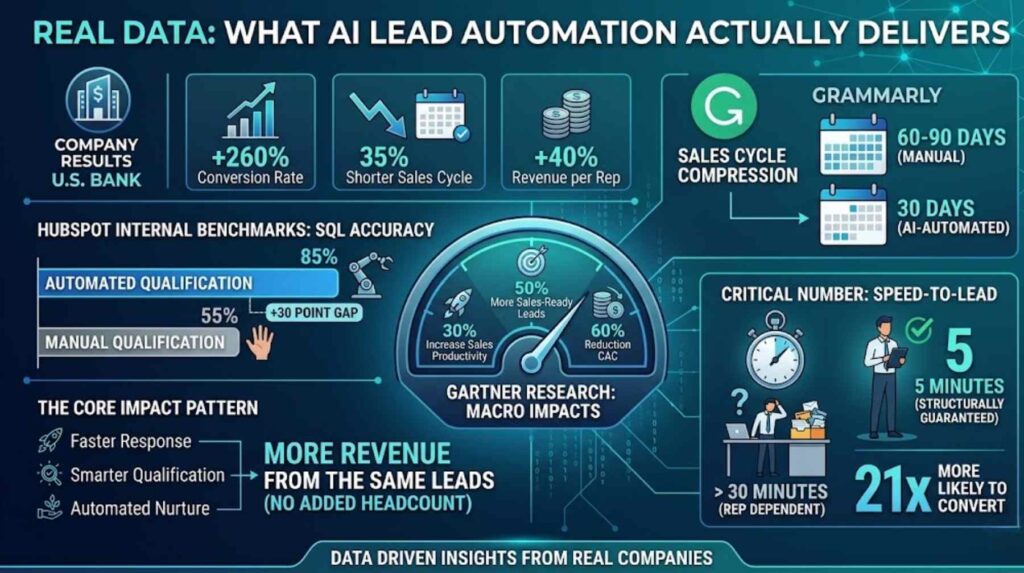
At the macro level, Gartner’s research shows AI-driven scoring yields a 30% increase in sales productivity, 50% more sales-ready leads, and a 60% reduction in customer acquisition cost.
The pattern is consistent across every company size and industry: faster response, smarter qualification, and automated nurture combine to produce more revenue from the same number of leads without adding headcount.
The most important number to watch is speed-to-lead. Leads contacted within five minutes are 21 times more likely to convert than those reached after 30 minutes. AI lead automation makes sub-five-minute response structurally guaranteed — not dependent on whether a sales rep happens to be looking at their inbox.
Common Mistakes to Avoid When Building Lead Automation
Building AI lead automation is not technically difficult. However, the same mistakes appear repeatedly across every implementation we have reviewed at Logic Issue.
Automating before cleaning your data is the most expensive error. AI scoring models rely on consistent, structured CRM data. If your existing contact records have mismatched fields, duplicate entries, or missing properties, the AI will make poor routing decisions. Audit and clean your CRM before connecting any automation layer.
Over-complicating the scoring model from day one wastes time and creates maintenance overhead. Start with four to six scoring variables and a simple three-tier classification. Add complexity only after measuring the initial system’s performance for 60 days. The best lead automation systems are typically simpler than their builders expect.
Forgetting to build error handling means your pipeline will silently fail when an API goes down or returns an unexpected response. Every production scenario needs an error notification route that fires a Slack alert when a module fails. Without this, leads can disappear into a broken workflow for days before anyone notices. For a full production workflow setup guide, review our AI workflow automation services page.
Treating automation as a replacement for sales strategy is the philosophical error that undermines many implementations. Automation amplifies what already works. If your offer is weak, your ICP is unclear, or your sales process has fundamental gaps, automation will surface those problems faster — it will not solve them. Fix the fundamentals first, then automate.
Building Lead Automation as an Agency Service
If you are a consultant or agency owner reading this, AI lead automation is one of the most valuable and deliverable services you can offer clients in 2026. The ROI is measurable, the implementation timeline is short, and the ongoing maintenance creates a natural recurring revenue relationship.
A typical agency lead automation engagement at Logic Issue follows this structure. The first week involves a discovery session to map the client’s current lead flow, identify the highest-volume sources, and define the ideal customer profile. Week two involves building and testing the core qualification pipeline — webhook to scoring to routing to CRM. Week three delivers the nurture sequences, behavioural triggers, and sales team notification system. Week four involves monitoring, optimisation, and handover documentation.
The result is a fully operational lead automation system that the client can run independently, with optional ongoing support for credit optimisation, scoring model updates, and workflow expansion.
For a practical example of what these systems deliver, our workflow automation case studies document real client results. If you are interested in partnering with Logic Issue to deliver automation services to your own clients, visit our partner programme.
Personal Experience: What 40 Lead Automation Builds Taught Us
After building lead automation systems for dozens of clients, three insights stand out above everything else.
The first is that response speed matters more than almost every other variable. Before any AI scoring, before any enrichment, before any nurture sequence — simply getting a personalised response to a lead within five minutes of their submission changes conversion rates dramatically. If you can only build one thing today, build the instant response workflow.
The second is that AI scoring is not magic. The model is only as good as the prompt and the ICP definition behind it. We have seen businesses deploy AI scoring with a vague customer profile and end up routing cold leads to sales as hot prospects. Take two hours to properly define your ideal customer before writing the scoring prompt. It is the most important document in the entire system.
The third is that the best lead automation systems are largely invisible to the prospect. They feel like a highly attentive, knowledgeable team member who happened to respond instantly and knew exactly what the prospect was looking for. That illusion of personal attention, delivered automatically at scale, is the commercial value of everything described in this guide.
If you want the Logic Issue team to build your AI lead automation system, explore our CRM and lead intelligence automation services or get in touch directly.
Frequently Asked Questions

What is AI lead automation and how does it work?
AI lead automation is the use of artificial intelligence and workflow automation tools to capture, enrich, score, route, and nurture sales leads without manual intervention. When a prospect submits a form, fills out a Lead Ad, or sends an email inquiry, an automated system processes that data in real time — appending enrichment information, running it through an AI scoring model, classifying the lead as hot, warm, or cold, and triggering the appropriate response chain automatically. The entire process happens within seconds of the initial contact.
Which is the best tool for AI lead automation in 2026?
The best tool depends on your volume and technical capacity. Make.com is the best starting point for most agencies and small businesses — it is visual, powerful, and affordable at moderate lead volumes. n8n is the better choice for high-volume pipelines or data-sensitive environments requiring self-hosting. GoHighLevel is the recommended CRM for agencies because it combines pipeline management, email and SMS marketing, and appointment booking in one platform. Most production systems use a combination of two or three tools working together.
How long does it take to build a lead automation system?
A basic instant-response and lead capture pipeline takes four to six hours to build. A full AI qualification, scoring, routing, and nurture system takes two to five days depending on the number of lead sources, CRM complexity, and the depth of the nurture sequences required. No-code platforms like Make.com make this timeline accessible to non-developers. However, getting the AI scoring prompt and ICP definition right takes more thought than the technical build itself.
How much does AI lead automation cost to run monthly?
Running costs depend on lead volume and the tools used. A Make.com Core plan at $10.59 per month handles most small business pipelines. Adding an enrichment API like Apollo.io costs $49–$99 per month depending on usage. AI scoring via the Claude or OpenAI API at moderate volumes costs $10–$30 per month with your own API key. A complete production system for most small agencies runs at $70–$150 per month in tool costs, delivering a return that typically justifies the investment within the first week.
Can AI lead automation work for a small business or solo operator?
Absolutely. The same system architecture scales down to solo operators and small teams with minor adjustments. A one-person consultancy receiving 20 inquiries per month benefits just as much from instant AI-scored responses as a team receiving 2,000. The build time is shorter, the operating cost is lower, and the competitive advantage is proportionally larger because most small businesses are responding to leads slowly and manually. Logic Issue offers AI automation services tailored to businesses of all sizes in Dublin, Pakistan, and internationally.