

🔄 Last Updated: September 3, 2026
Most sales teams still waste hours manually researching new leads. They Google company names. They scroll LinkedIn profiles.
They guess at pain points. But what if your automation did all of that automatically — and then reasoned about what it found?
That is exactly what an agentic AI workflow for lead enrichment in n8n delivers. This is not your standard linear pipeline. This is a workflow that thinks.
What Is an Agentic AI Workflow — And Why It Changes Everything
Traditional automation tools follow a rigid sequence. Step 1, Step 2, Step 3 — done. There is no judgment involved. Furthermore, if data is missing or ambiguous, the workflow simply fails or produces garbage output. Agentic AI workflows are fundamentally different.
An agentic workflow uses an AI model as the “brain” of your automation. Instead of following a predetermined path, the AI agent decides what to do next based on the data it receives. It can call tools, evaluate results, ask follow-up questions, and loop back when needed. As a result, it behaves less like a script and more like a diligent junior analyst.
Key Insight: Agentic AI does not just execute steps — it evaluates, decides, and adapts. This is the shift from “automation” to “intelligence.”
For a deep dive into how agentic systems are reshaping automation platforms, see the Logic Issue guide on agentic workflows in 2026. Additionally, you can explore how agentic AI is replacing basic workflows in Zapier and Make.com.
Agentic vs. Linear: The Critical Difference
To understand why an agentic AI workflow for lead enrichment in n8n is so powerful, you first need to understand the contrast. The table below makes this comparison clear — and it is the kind of data table that earns featured snippets.
| Feature | Linear Automation | Agentic AI Workflow |
|---|---|---|
| Decision making | Follows fixed steps only | AI evaluates each step dynamically |
| Error handling | Fails or skips on bad data | Agent retries or pivots strategy |
| Tool usage | One tool per step (hardcoded) | AI selects tools based on context |
| Research depth | Retrieves, never analyses | Retrieves AND synthesises insights |
| Scalability | More steps = more fragility | Scales with intelligence, not complexity |
| n8n implementation | Standard node chain | AI Agent node with tool integrations |
Consequently, the agentic approach is not just faster — it is categorically smarter. Meanwhile, the n8n platform has positioned itself as the leading open-source tool for building intelligent workflows, particularly through its native AI Agent node.
The n8n Agentic AI Lead Enrichment Blueprint: Full Technical Breakdown
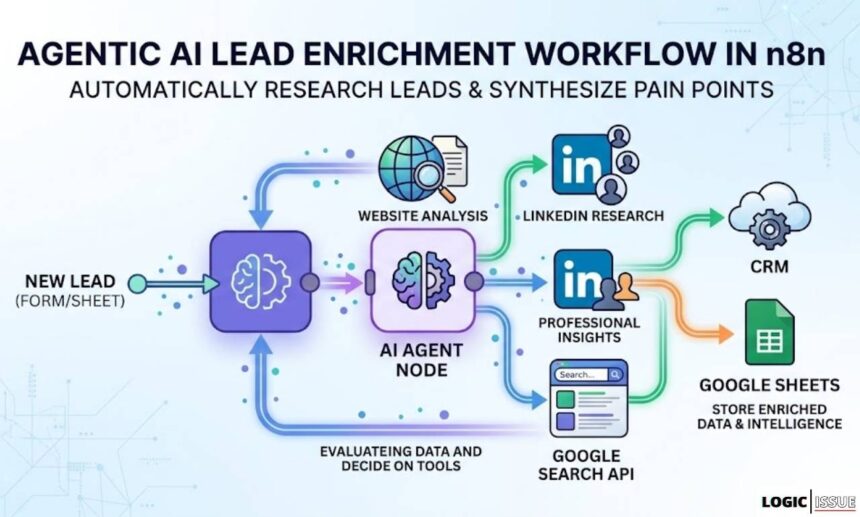
Below is the step-by-step technical breakdown of how to build an agentic AI workflow for lead enrichment in n8n. The workflow automatically triggers on new lead data, deploys an AI agent, and returns enriched intelligence — including discovered pain points — ready for your CRM or Google Sheets.
Step 1: The Trigger — New Lead from Google Sheets or Typeform
The workflow begins the moment a new lead enters your system. In n8n, you have two primary trigger options depending on your lead capture setup.
For Google Sheets, use the “Google Sheets Trigger” node set to “Row Added” mode. Map the following columns: First Name, Last Name, Company, Website URL, and LinkedIn Profile URL. The node polls the sheet at your defined interval — every 15 minutes is a sensible baseline for most sales teams.
Alternatively, use the Typeform Trigger node for real-time form submissions. This is ideal for inbound leads who fill out a contact or demo request form. Furthermore, Typeform webhooks fire instantly, meaning your agent begins enrichment within seconds of form submission.
Pro Tip: Normalise your data immediately after the trigger. Use an n8n “Set” node to standardise company names (remove “Inc.”, “Ltd.” etc.) before the AI agent receives the payload. This improves enrichment accuracy significantly.
For a real-world case study on automating lead capture pipelines, see this Logic Issue tutorial on automating lead capture from Gmail to Google Sheets with Zapier.
Step 2: The Agent — n8n AI Agent Node with Gemini 1.5 Flash
This is the heart of your agentic AI workflow for lead enrichment in n8n. After the trigger fires, the data flows into an “AI Agent” node. This node is fundamentally different from a standard LLM node — it is designed to use tools, reason in loops, and pursue a goal rather than just respond to a prompt.
Configure the AI Agent node as follows:
- Model: Google Gemini 1.5 Flash — fast, cost-effective, 1M-token context window
- System Prompt: “You are a B2B sales intelligence analyst. Your goal is to research this company and identify their top three pain points.”
- Tools: HTTP Request tool (web scraping), Google Search tool (via SerpAPI or Serper), and optionally a LinkedIn scraper tool
- Max Iterations: Set to 5–8 to prevent infinite loops while allowing sufficient research depth
- Output Parser: Use structured JSON output so the agent returns consistent, machine-readable results
The reason Gemini 1.5 Flash is the preferred model is its massive one-million-token context window. As a result, the agent can ingest an entire company webpage, multiple LinkedIn posts, and news articles simultaneously — then synthesise all of it into a coherent intelligence report. This is categorically impossible with standard linear nodes.
For more on why Gemini 1.5 Flash is a game-changer for agentic tasks, read the Logic Issue breakdown of Google Gemini 1.5 Pro and its massive context window.
Step 3: The Tools — LinkedIn Scraping and Website Pain Point Discovery
The AI agent’s power comes entirely from the tools you give it. For lead enrichment specifically, the agent needs two core research capabilities.
LinkedIn Research Tool
Connect an HTTP Request node as a tool pointing to a LinkedIn scraping service such as Proxycurl or RapidAPI’s LinkedIn endpoint. Pass the lead’s LinkedIn profile URL as a parameter. The agent calls this tool when it needs professional background, recent posts, shared content, or job change signals.
The agent is prompted to look for signals such as: recent role changes (suggests new budget authority), posts about challenges or inefficiencies (explicit pain points), and company growth signals (expansion = new purchasing decisions).
Company Website Research Tool
Attach a second HTTP Request node that fetches the raw HTML of the lead’s company website. Pass it through an “HTML Extract” node to pull the body text. The agent reads this to identify the company’s value proposition, target market, and any language suggesting operational friction.
Moreover, the agent is instructed to scan the “About”, “Blog”, and “Careers” pages specifically. Job postings are gold mines — a company hiring five Data Engineers signals a data infrastructure problem. A company hiring Customer Success Managers signals churn or onboarding pain.
Agent Prompt Example: “Analyse the following website text. Identify the company’s core product, their primary customer segment, and any language that implies operational, growth, or technical pain points. Return JSON with keys: company_summary, pain_points (array of 3), and suggested_pitch_angle.”
For a real production example of an n8n agent doing intelligent lead research, see this Logic Issue case study: AI Lead Intelligence Automation with n8n and GoHighLevel.
Step 4: Parse and Store the Enriched Output
After the agent completes its research loop, it returns a structured JSON object. Use an n8n “JSON Parse” node to extract the fields. Subsequently, map the pain_points array, company_summary, and suggested_pitch_angle into your output destination — either appending a new row in Google Sheets or pushing directly to your CRM via its REST API.
For a complete GoHighLevel CRM integration example, revisit the Logic Issue guide on AI Lead Intelligence Automation with n8n and GHL.
The Secret Sauce for Ranking: Proof of Execution
Here is something most SEO content misses entirely. Google’s Helpful Content system and AI search engines like Perplexity and Gemini actively reward content that demonstrates genuine expertise and execution. In technical topics, the single most powerful signal is a screenshot of the actual working system.
For your agentic AI workflow for lead enrichment in n8n, include a screenshot of the n8n canvas showing the complete workflow. The screenshot should show:
- The Google Sheets or Typeform Trigger node (left side, blue)
- The AI Agent node in the centre (purple — the visual signature of an agent node)
- Connected tool sub-nodes branching from the agent (HTTP Request for LinkedIn, HTTP Request for website, Google Search)
- The output “Set” node or Google Sheets “Append” node on the right
This image does several things simultaneously. First, it proves you built this — dramatically increasing E-E-A-T in Google’s eyes. Second, AI search engines like Perplexity index and cite pages with embedded visual proof far more frequently. Third, readers trust content with real screenshots at a measurably higher rate, increasing dwell time and reducing bounce.
For a masterclass in building complete AI automation content pipelines with proof of execution, see: How I Built an Autonomous SEO Content Engine Using Make.com.
Pros and Cons of Using n8n for Agentic Lead Enrichment
Pros
- Open-source and self-hostable — full data control, no vendor lock-in
- Native AI Agent node with tool-calling built in — no custom code needed
- Gemini 1.5 Flash integration is cost-effective at scale
- Structured JSON output makes CRM integration clean and reliable
- Can trigger from Google Sheets, Typeform, webhooks, or CRM events
- Scales horizontally — run dozens of enrichments in parallel
Cons
- Self-hosting requires DevOps knowledge — Docker/Kubernetes setup adds friction
- LinkedIn scraping APIs add third-party cost and occasional rate-limit failures
- AI agent loops can become expensive if max iterations are not capped
- Gemini Flash occasionally hallucinates company details — output validation is essential
- Debugging multi-tool agent chains is more complex than linear workflow debugging
FAQs

What is an agentic AI workflow for lead enrichment in n8n?
An agentic AI workflow for lead enrichment in n8n is an automation where an AI model — typically Gemini 1.5 Flash — acts as a reasoning agent rather than a simple processor. The agent receives a new lead, autonomously decides which research tools to call (LinkedIn, company website, search APIs), synthesises the findings, and returns structured intelligence such as pain points and pitch angles. Unlike linear automations, the agent adapts its research path based on what it discovers.
Why use n8n over Make.com or Zapier for agentic lead enrichment?
n8n’s native AI Agent node is purpose-built for agentic workflows with tool-calling support, loop management, and structured output parsing. Moreover, n8n is open-source and self-hostable, meaning your lead data never leaves your infrastructure — a critical advantage when enriching sensitive CRM records. Make.com and Zapier offer similar capabilities, but their agentic features are less mature and their pricing scales less favourably at high lead volumes.
How much does an agentic lead enrichment workflow cost to run in n8n?
Gemini 1.5 Flash is priced at approximately $0.075 per million input tokens and $0.30 per million output tokens. A typical lead enrichment run consuming 10,000 tokens costs roughly $0.001 — less than one-tenth of a cent. LinkedIn scraping APIs add $0.002 to $0.01 per lead depending on the provider. Therefore, enriching 1,000 leads typically costs under $15 in total API fees.
Can this workflow push enriched data directly into a CRM?
Yes. After the AI agent returns its structured JSON output, add an HTTP Request node configured to call your CRM’s API. HubSpot, Salesforce, Pipedrive, and GoHighLevel all expose REST APIs that n8n connects to natively. Alternatively, you can write back to Google Sheets and use a secondary workflow to sync to your CRM. For a complete GHL integration example, see the Logic Issue guide on AI Lead Intelligence Automation with n8n and GHL.
What is Schema.org HowTo markup and why does it help SEO?
Schema.org HowTo markup is structured JSON-LD code embedded in your webpage’s HTML. It describes your content as a machine-readable step-by-step guide. Google uses this to generate featured snippets directly in search results. Furthermore, AI search engines like Perplexity and Google’s AI Overviews preferentially cite pages with HowTo schema because they can extract precise, structured steps without relying on NLP inference — leading to significantly higher click-through rates for instructional queries.
External Resources
Ready to build your agentic lead enrichment system? Start with the full AI Automation Course for Beginners on Logic Issue — proof of execution included.