



Mastering the blooket login process has become essential for educators and students embracing this platform’s engaging approach to knowledge acquisition. Navigating the initial step of your Blooket journey should be as smooth as the platform’s interactive games. Whether you are a seasoned user or a newcomer eager to explore its educational treasures, a seamless login experience is paramount.
This step-by-step guide aims to equip you with the knowledge to effortlessly access Blooket, ensuring that technical hurdles do not stand in the way of your learning adventure. Prepare to unlock the full potential of Blooket with ease.
What Is Blooket?
An Innovative Learning Platform
Blooket is an educational platform that transforms traditional learning methods into a dynamic, engaging experience. Designed primarily for educators, Blooket allows teachers to create interactive quizzes and trivia games that align with their curriculum. As a web-based platform, Blooket doesn’t require any app downloads, making it easily accessible for both teachers and students. Educators can tailor question sets to fit specific educational goals and deliver them in various game modes, such as Gold Quest, Battle Royale, and Factory, each offering unique challenges and levels of complexity.
Engaging Game Modes
The variety of game modes on Blooket is a testament to its versatility. These modes, which include Classic, Cafe, and Racing, enable students to engage with material in a fun and competitive manner, fostering a love for learning. The platform is free to use; students can join games by entering a pin provided by the teacher, removing barriers to entry and facilitating seamless participation.
Educational Benefits
Blooket not only enhances student engagement but also supports diverse learning styles by integrating playful competition with educational content. This game-based learning approach helps students develop essential skills such as critical thinking, problem-solving, and teamwork. Furthermore, Blooket tracks performance and provides teachers with valuable insights to adapt their teaching strategies, ensuring an optimal learning environment.
How to Create a Blooket Account
Sign-Up Process
Creating a Blooket account is a straightforward process that allows you to dive into a world of interactive learning. To start, head over to Blooket.com and click on “Sign Up”. You have the option to register as either a student or a teacher, which tailors your experience to suit educational or classroom needs.
If you choose to use your Google account, the process is expedited with minimal input required. Alternatively, if opting for an email sign-up, you’ll need to enter your email address and a code will be sent for account verification. Regardless of your choice, ensure you are at least 13 years old, or 16 if located outside the United States.
Account Details
Your journey into the engaging world of Blooket begins with providing some basic information. After verifying your email, you’ll enter and confirm a secure password. Next, select a unique username that will become your online identity. Checking the box to agree to Blooket’s Privacy Policy and Terms of Service is the final step to securing your Blooket login.
Upon completion, your account is ready, unlocking access to various modes of play and a plethora of educational content. For those looking to enhance their Blooket experience, subscriptions like Blooket Plus offer additional features and benefits. Embrace the fun, interactive environment while achieving your educational goals!
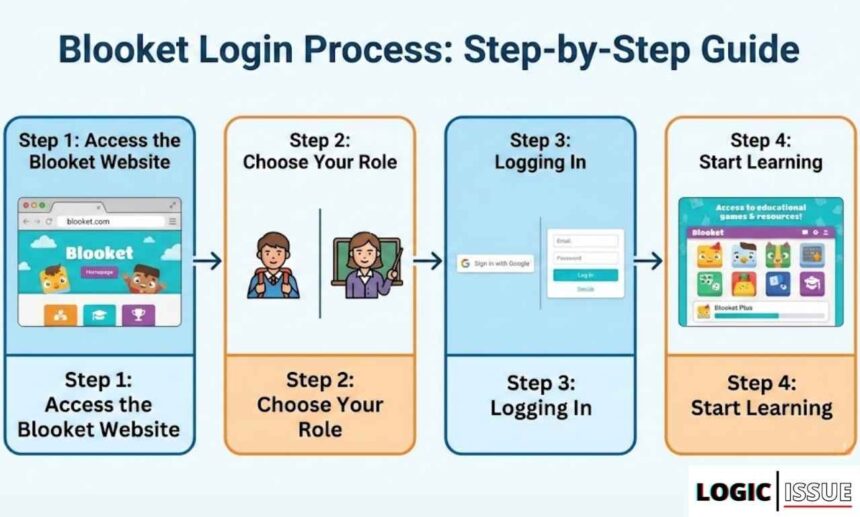
Blooket Login Process: Step-by-Step Guide
Step 1: Access the Blooket Website
To embark on the interactive journey that Blooket offers, you need to start by navigating to the official Blooket website. Here, you’ll find various educational tools and games designed to enhance learning through engagement. Before you dive into the activities, ensuring a seamless Blooket login experience is crucial.
Step 2: Choose Your Role
Upon reaching the homepage, decide if you are signing in as a Student or Teacher. Selecting the appropriate role tailors the Blooket platform to meet your specific needs, whether you’re managing a class or participating in a game.
Step 3: Logging In
- Google Account: Click on the Google sign-in option if you prefer a swift login process using your existing Google account credentials.
- Email and Password: Alternatively, enter your registered email address and password. Ensure your password is secure yet memorable.
For those venturing here for the first time, you’ll need to create an account. Set it up by selecting “Sign Up,” providing the necessary details like your date of birth, and agreeing to the terms of service.
Step 4: Start Learning
With the Blooket login completed, you now have access to an array of educational games and resources. The platform supports a vibrant learning environment with features like Blooket Plus and Blooket Group Plans, perfect for both individual and classroom use. Enjoy seamless access to these tools, enhancing your educational experience with the click of a button!
Features of the Blooket Dashboard
The Blooket Dashboard offers a dynamic, user-friendly interface designed to enhance the educational experience for both teachers and students. By logging into the Blooket dashboard, users can access a variety of features that transform traditional learning into interactive, engaging activities.
Interactive Game Modes
A core feature of the Blooket dashboard is its range of interactive game modes designed to cater to diverse learning styles. Whether you prefer the competitive Classic Mode or the collaborative Team Mode, the platform supports varied educational objectives, making learning fun and effective. These game modes allow students to participate actively, with real-time feedback enhancing their understanding and retention of material.
Customization and Creation
For creative and personalized learning, the dashboard allows the creation of custom question sets, which can include multimedia content. Teachers can tailor educational materials to meet specific curricular needs. Furthermore, the availability of a vast library of pre-made question sets provides flexibility to select content that aligns perfectly with lesson objectives.
Comprehensive Tracking and Analytics
The Blooket dashboard tracks user progress through its Stats section, which details games played, tokens earned, and performance analytics. This feature aids teachers in identifying students’ strengths and areas for improvement, thereby enabling more targeted teaching approaches. Complementary integration with analytic tools enriches data-driven insights for enhanced educational outcomes.
By leveraging these robust features through the seamless Blooket login process, educators can craft a dynamic and interactive learning environment, driving student engagement and success.
How to Join a Blooket Game
Joining a Blooket game is straightforward and accessible with a few simple steps. First, you’ll need a game code, which is a unique identifier generally provided by the teacher or game host. This code is your gateway to enter a live session and start interacting with the game content.
Obtain the Game Code
The game code is crucial for accessing a Blooket game. Ensure that you receive this code from your teacher or host, who should share it ahead of time. You may also receive the code via email or an educational platform message. It’s essential to enter the correct sequence of numbers; make sure to double-check to avoid any errors.
Visit the Blooket Platform
Once you have the code, head over to Blooket’s website. On the homepage, you’ll find the “Join a Game” button. Clicking this will prompt you to enter the seven-digit game code. Alternatively, you can also scan a QR code provided by your host, or click on a join link if it’s shared with you.
Choose Your Nickname
Upon entering the game code, you’ll be asked to select a nickname. This could be a personalized name or a randomly generated nickname, depending on the game settings. Your nickname will be used to track your progress, so choose wisely. If you’re participating regularly, you might want to stick with a memorable nickname.
Prepare for the Game
After entering your nickname, you can select a Blook—a character that represents you in the game. Wait for the game to start, which requires your host to initiate the session once all participants have joined. Be sure to have a stable internet connection to enhance your “Blooket login” experience and minimize the potential for lag or disconnects.
Advanced Tips for a Better Blooket Experience
Experiment with Diverse Game Modes
Blooket offers a variety of game modes designed to match different learning objectives and styles. Each game mode—whether it’s the speed-focused Race, the strategy-based Gold Quest, or the fast-paced Cafe—caters to unique aspects of learning, transforming routine exercises into engaging challenges. By leveraging these options, you can create a more personalized and dynamic classroom experience.
Integrate Custom Content and Visuals
Customizing your Blooket sessions with personalized questions and thematic visuals can greatly enhance learning retention. By aligning questions with your curriculum and student needs, and incorporating images and videos, you provide context that supports visual learners. Delving into Blooket’s flexibility allows for narrative-driven experiences and media-rich questions, which can make the content more relevant and memorable for students.
Utilize Feedback and Analytics Tools
Blooket’s real-time analytics and feedback provide a goldmine of insights that help you fine-tune your educational strategies. These tools allow educators to assess student performance, address learning gaps, and adjust content accordingly, fostering a more responsive teaching environment. Utilizing these insights can elevate classroom learning, making the Blooket login process the gateway to a well-integrated educational tool.
Conclusion
In navigating the Blooket login process, you have now equipped yourself with the tools for a seamless experience. By following this step-by-step guide, you ensure not only a smooth entry into Blooket’s vibrant educational platform but also enhance your ability to leverage its full potential. As you continue exploring Blooket’s offerings, remember that a well-executed login is your gateway to engaging learning opportunities. Keep these steps handy, and confidently embark on your educational journey with Blooket, where innovative learning meets fun. Your proactive approach today paves the way for tomorrow’s successful educational endeavors.
See Also: Blooket Hacks 2026: Ultimate Token & Rare Blook Guide
